Shopping for senior-friendly laptops and tablets means balancing two things that rarely go together: simplicity and capability. The Microsoft Surface Go (Renewed) stands out as my best overall pick because it pairs a familiar Windows 11 desktop with a forgiving 10-inch touchscreen and enough power for email, video calls, and web browsing without lag. For seniors who want the least possible learning curve, the Pix-Star Touch Easy-to-Use Tablet simplifies everything down to large icons and family-managed settings, while the HP 14″ Chromebook offers a bigger screen and near-zero maintenance at a budget price. The main tradeoff in this category is between locked-down simplicity (Pix-Star, Chromebooks) and full flexibility (Windows 2-in-1s like the NewBook and Dynabook), plus a real divide between cheap Android bundles and name-brand reliability. Read on for the full ranked breakdown, including which budget picks are actually worth it and which to skip.
Complete the kit


Key Takeaways
- Windows 2-in-1s like the Surface Go and NewBook ranked highest because seniors get a touchscreen plus a real keyboard and desktop interface they may already know from older PCs, avoiding the Android learning curve entirely.
- The Pix-Star Touch is the only true purpose-built senior tablet in the lineup; everything else is a general-purpose device adapted with accessibility settings, which matters if resistance to new technology is the biggest barrier.
- Ultra-cheap Android bundles (the Jeazans and the no-name 10.1″ Office 365 models) carry inflated RAM numbers and inconsistent quality; they only make sense for light, occasional use where a $500+ device would be overkill.
- Chromebooks (HP 14″ and Lenovo 2-in-1) win on maintenance and security for seniors without a tech-savvy family helper, since updates are automatic and malware risk is near zero, but they struggle with Windows-only software.
- The Lenovo Idea Tab and HNVHNV 11-inch are the strongest picks for media-heavy users thanks to sharp 2.5K/90Hz displays, but neither replaces a laptop for typing-heavy tasks like email newsletters or document editing.
| Jeazans Android 16 Tablet 10.1 Inch 2-in-1 Bundle with Keyboard, Mouse, Stylus, Leather Case |  | Best Complete Bundle for the Money | Display: 10.1 inches | Operating System: Android 16 | RAM: 24GB (3GB + 21GB virtual) | VIEW LATEST PRICE | See Our Full Breakdown |
| TOSHIBA Dynabook K50 10.1″ Windows 2-in-1 Touchscreen Laptop (Renewed) |  | Best Budget Windows Familiarity | Processor: Intel Celeron N4020 | Display: 10.1-inch HD touchscreen (1280 x 720) | RAM: 4GB | VIEW LATEST PRICE | See Our Full Breakdown |
| Microsoft Surface Go Tablet, 10-inch Touchscreen, Intel Pentium 4415Y, 8GB RAM, 128GB SSD (Renewed) |  | Best Premium Pick | Processor: Intel Pentium 4415Y, 1.6GHz | Display: 10-inch PixelSense, 1800×1200 | RAM: 8GB LPDDR3 | VIEW LATEST PRICE | See Our Full Breakdown |
| 2-in-1 Laptop/Tablet (2026), 10.1″ FHD IPS Touchscreen, 1-Year Office 365 |  | Best for Document Work | Display: 10.1-inch IPS touchscreen | Processor: Intel Pentium Gold 6500Y, up to 3.4GHz | RAM: 8GB | VIEW LATEST PRICE | See Our Full Breakdown |
| HNVHNV Android 16 Tablet with Keyboard, 11 inch, 34GB RAM + 128GB Storage |  | Best Big-Screen Value | Display: 11-inch IPS, 90Hz | Operating System: Android 16 | Processor: Octa-Core T7280, 2.2GHz | VIEW LATEST PRICE | See Our Full Breakdown |
| 11-inch Android Tablet with 32GB RAM and 128GB Storage (Expandable to 2TB) |  | Best Entertainment Tablet for Seniors | Display: 11-inch FHD+ IPS, 90Hz refresh rate | Processor: Octa-Core 2.2GHz | RAM: 32GB (expandable up to 24GB) | VIEW LATEST PRICE | See Our Full Breakdown |
| 2026 Android 15 Tablet with Keyboard, 10.1 Inch, 18GB RAM, 128GB Storage, Gray |  | Best Value Bundle | Display: 10.1-inch IPS | RAM: 18GB (6GB physical + 12GB virtual) | Storage: 128GB, expandable to 1TB via TF card | VIEW LATEST PRICE | See Our Full Breakdown |
| 2-in-1 Laptop/Tablet (2026), 10.1″ FHD IPS Touchscreen, 1-Year Office 365 |  | Best for Familiar Windows Software | Display: 10.1-inch IPS touchscreen, 1280×800 | Processor: Intel Pentium Gold 6500Y up to 3.4GHz | RAM: 8GB DDR3 | VIEW LATEST PRICE | See Our Full Breakdown |
| HP 14″ Touchscreen Chromebook Laptop, 4GB RAM, 64GB SSD, Sky Blue |  | Best for Simplicity and Security | Display: 14-inch HD touchscreen, 1366×768 | Processor: Intel N100 (4-core, 3.40 GHz max turbo) | RAM: 4GB LPDDR4 | VIEW LATEST PRICE | See Our Full Breakdown |
| 10.1-Inch Windows 11 Touchscreen Tablet PC with Intel Celeron Processor, 6GB RAM, 128GB Storage | 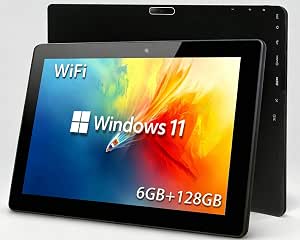 | Cheapest Windows Option — Buy with Caution | Display: 10.1-inch touchscreen, 1280×800 | Processor: Intel Celeron 1.6GHz quad-core | RAM: 6GB | VIEW LATEST PRICE | See Our Full Breakdown |
| NewBook 10.1 inch 2-in-1 Laptop Tablet PC |  | Best Familiar Windows Experience | Display: 10.1 inch FHD Touchscreen | Processor: Intel Pentium Gold 6500Y | RAM: 8GB | VIEW LATEST PRICE | See Our Full Breakdown |
| Pix-Star Touch Easy-to-Use Tablet for Seniors |  | Simplest Interface for Absolute Beginners | Screen Size: 10.1 inches | Storage: 32 GB | Cameras: Front and rear | VIEW LATEST PRICE | See Our Full Breakdown |
| Android 16 Tablet with Keyboard – 13 inch |  | Biggest Screen for Easy Reading | Display: 13.4 inch, 1920 x 1200, 120Hz | Processor: MediaTek T615 octa-core | RAM: 32 GB | VIEW LATEST PRICE | See Our Full Breakdown |
| Lenovo Chromebook 2-in-1 |  | Best for Low-Maintenance Computing | Display: 14″ WUXGA IPS Touchscreen | Processor: Intel N150 | RAM: 4GB | VIEW LATEST PRICE | See Our Full Breakdown |
| Lenovo Idea Tab – 11″ 2.5K Tablet with Pen and Folio Case |  | Best Balanced Tablet Value | Display: 11-inch 2.5K IPS touchscreen | Refresh Rate: 90Hz | Processor: MediaTek Dimensity 6300 | VIEW LATEST PRICE | See Our Full Breakdown |
| senior-friendly laptops and tablet | Storage | Display | RAM | Operating System |
|---|---|---|---|---|
| Jeazans Android 16 Tablet 10.1 | 64GB, expandable to 1TB | 10.1 inches | 24GB (3GB + 21GB virtual) | Android 16 |
| TOSHIBA Dynabook K50 10.1" Win | 64GB SSD | 10.1-inch HD touchscreen (1280 x 720) | 4GB | Windows 11 Pro |
| Microsoft Surface Go Tablet | 128GB NVMe SSD | 10-inch PixelSense, 1800×1200 | 8GB LPDDR3 | Windows 11 Pro |
| 2-in-1 Laptop/Tablet | 256GB SSD | 10.1-inch IPS touchscreen | 8GB | Windows 11 Home with 1-year Office 365 |
| HNVHNV Android 16 Tablet with | 128GB, expandable to 2TB | 11-inch IPS, 90Hz | 34GB (combined) | Android 16 |
| 11-inch Android Tablet with 32 | 128GB, expandable to 2TB via microSD | 11-inch FHD+ IPS, 90Hz refresh rate | 32GB (expandable up to 24GB) | Android 16 |
| 2026 Android 15 Tablet with Ke | 128GB, expandable to 1TB via TF card | 10.1-inch IPS | 18GB (6GB physical + 12GB virtual) | Android 15 |
| 2-in-1 Laptop/Tablet | 256GB SSD | 10.1-inch IPS touchscreen, 1280×800 | 8GB DDR3 | Windows 11 Home |
| HP 14" Touchscreen Chromebook | 64GB eMMC | 14-inch HD touchscreen, 1366×768 | 4GB LPDDR4 | Chrome OS |
| 10.1-Inch Windows 11 Touchscre | 128GB SSD, expandable via 512GB TF card | 10.1-inch touchscreen, 1280×800 | 6GB | Windows 11 |
| NewBook 10.1 inch 2-in-1 Lapto | 256GB SSD | 10.1 inch FHD Touchscreen | 8GB | Windows 11 |
| Pix-Star Touch Easy-to-Use Tab | 32 GB | — | — | — |
| Android 16 Tablet with Keyboar | 256 GB, expandable to 2TB | 13.4 inch, 1920 x 1200, 120Hz | 32 GB | Android 16 |
| Lenovo Chromebook 2-in-1 | 128GB UFS | 14" WUXGA IPS Touchscreen | 4GB | — |
| Lenovo Idea Tab | 128 GB | 11-inch 2.5K IPS touchscreen | 4 GB | — |
More Details on Our Top Picks
Jeazans Android 16 Tablet 10.1 Inch 2-in-1 Bundle with Keyboard, Mouse, Stylus, Leather Case
What makes this Jeazans bundle appealing for budget-conscious buyers isn’t the tablet itself — it’s that everything arrives in one box: keyboard, mouse, stylus, leather case, and charger. Compared with the Microsoft Surface Go, which ships with no keyboard or pen and costs far more, this option removes the accessory math entirely. Android 16 with 24GB of combined RAM handles email, video calls, and streaming without lag, and the 1TB expansion slot means storage anxiety is off the table.
The tradeoffs are real, though. The unspecified camera quality matters for anyone doing regular video calls, and the “AMD 1.8 GHz” processor branding is vague in a way that makes honest performance comparisons hard. Still, for a low-risk first tablet, the completeness wins out.
Pros:- Complete accessory bundle included — keyboard, mouse, stylus, and case add real value
- Android 16 is current and simple to learn for new users
- 1TB expansion slot removes any storage worries
- WiFi 6 and fast charging keep daily use convenient
Cons:- Camera specifications are undisclosed, so video call quality is unpredictable
- No-name processor makes long-term performance and support uncertain
- Bundle adds bulk if you only want a lightweight tablet
Best for: First-time tablet buyers on a tight budget who want every accessory included and don’t want to shop for add-ons separately
Not ideal for: Seniors who plan frequent video calls with family — the unspecified camera quality makes video performance a gamble
- Display:10.1 inches
- Operating System:Android 16
- RAM:24GB (3GB + 21GB virtual)
- Storage:64GB, expandable to 1TB
- Connectivity:WiFi 6, Bluetooth 5.4
- Included:Keyboard, mouse, stylus, leather case, fast charger
Our verdict“This is the pick when upfront price and included accessories matter more than brand reliability.”
TOSHIBA Dynabook K50 10.1″ Windows 2-in-1 Touchscreen Laptop (Renewed)
Many seniors have spent decades on Windows, and relearning a new operating system is a genuine barrier. That’s the case for this renewed Dynabook K50: it delivers the full Windows 11 Pro desktop — including Internet Explorer-era habits like file folders and desktop icons — at a price far below a new Windows machine. Compared with the Jeazans Android tablet, the advantage is familiarity; the cost is that Android is genuinely simpler for app-based tasks like video calling.
The hardware is modest. A Celeron N4020 with 4GB of RAM means patience is required when opening programs, and 64GB of storage fills up fast once Windows updates pile on. But the generous port selection — HDMI, USB-C, USB-A, microSD — makes it easy to connect an external monitor or drive, which the Surface Go can’t match without dongles.
Pros:- Full Windows 11 Pro keeps the familiar desktop experience
- Excellent port selection including HDMI and full-size USB-A
- 2-in-1 touchscreen adds flexibility for both sitting and lounging use
Cons:- 4GB of RAM makes multitasking slow and frustrating
- 64GB SSD is tight once Windows itself takes its share
- Renewed condition means variable battery health
Best for: Seniors who already know Windows and want a cheap touchscreen laptop for email, browsing, and documents without switching operating systems
Not ideal for: Anyone who stores photos or videos locally — 64GB of storage disappears quickly after Windows updates
- Processor:Intel Celeron N4020
- Display:10.1-inch HD touchscreen (1280 x 720)
- RAM:4GB
- Storage:64GB SSD
- Operating System:Windows 11 Pro
- Ports:USB-C, USB-A, HDMI, microSD, audio jack
Our verdict“Buy this only if Windows familiarity is the deciding factor and expectations stay basic.”
Microsoft Surface Go Tablet, 10-inch Touchscreen, Intel Pentium 4415Y, 8GB RAM, 128GB SSD (Renewed)
The Surface Go is the most refined device in this batch. Its 1800×1200 PixelSense display is noticeably sharper than the Dynabook’s 720p panel, and at 522 grams and 8.3mm thin, it’s the lightest full Windows machine here by a wide margin — a real difference for anyone with limited hand strength. The 8GB of RAM also means Windows behaves calmly where the Dynabook’s 4GB stutters.
Two things hold it back from a blanket recommendation. First, no keyboard or pen is included, and a proper Surface keyboard costs enough to change the total price considerably. Second, as a renewed unit with an aging Pentium 4415Y, battery life varies unit to unit — a meaningful concern for seniors who forget to charge devices nightly. Windows 11 Pro on a tablet also assumes some tech confidence.
Pros:- Sharpest, most responsive display in this group at 1800×1200
- Featherweight at 522 grams — easiest to hold of any Windows option here
- 8GB RAM and NVMe SSD deliver the smoothest Windows experience in the batch
- Premium build quality typical of Microsoft hardware
Cons:- Keyboard and pen sold separately, inflating the real cost
- Refurbished battery health varies between units
- Older processor limits it to light tasks despite the polished feel
Best for: Comfortable Windows users who value a light, premium-feeling device and are willing to buy the keyboard separately
Not ideal for: Buyers on a strict budget — after adding a genuine keyboard, the total cost rivals newer machines with warranties
- Processor:Intel Pentium 4415Y, 1.6GHz
- Display:10-inch PixelSense, 1800×1200
- RAM:8GB LPDDR3
- Storage:128GB NVMe SSD
- Operating System:Windows 11 Pro
- Weight:522 grams
- Connectivity:Wi-Fi ac, Bluetooth 4.1, USB-C 3.1
Our verdict“The best-built option here, but only worth it if the price plus a keyboard still beats buying new.”
2-in-1 Laptop/Tablet (2026), 10.1″ FHD IPS Touchscreen, 1-Year Office 365
This unnamed-brand 2-in-1 earns its spot for one reason: it ships with Windows 11 and a year of Office 365 pre-installed, so writing letters, editing documents, and printing work out of the box. That’s a stronger productivity story than the Jeazans or HNVHNV Android tablets, where Office requires workarounds or subscriptions handled separately. The magnetic keyboard case is included rather than sold apart, which the Surface Go can’t claim.
Be skeptical of the listing, though. The title promises FHD, but the listed 1280×800 resolution contradicts it — a red flag about seller transparency. The Pentium Gold 6500Y is capable but not quick, and with no battery life specified, buyers should assume modest endurance rather than all-day use.
Pros:- Office 365 included for a year — real documents, real printing, no setup fuss
- Magnetic keyboard included, unlike the Surface Go
- 256GB SSD offers double the storage of most rivals here
- 1.3 lb weight is comfortable for lap or couch use
Cons:- Listing contradicts itself on display resolution, which undermines confidence
- No battery life rating provided
- Pentium Gold processor slows under multiple open programs
Best for: Seniors who primarily need Word documents, email attachments, and printing, and want Office ready on day one
Not ideal for: Anyone who researches specs carefully — the contradictory resolution claims make the seller hard to trust
- Display:10.1-inch IPS touchscreen
- Processor:Intel Pentium Gold 6500Y, up to 3.4GHz
- RAM:8GB
- Storage:256GB SSD
- Operating System:Windows 11 Home with 1-year Office 365
- Weight:1.3 lbs
- Connectivity:2x USB-C, USB 3.0, Micro HDMI, Wi-Fi 5, Bluetooth 5.0
Our verdict“The most practical choice for document-centric users, as long as the seller’s spec inconsistencies don’t bother you.”
HNVHNV Android 16 Tablet with Keyboard, 11 inch, 34GB RAM + 128GB Storage
For seniors whose main complaint is small text and cramped screens, the HNVHNV’s 11-inch 90Hz display is the most comfortable viewing experience in this batch. The smooth 90Hz refresh makes scrolling feel gentler, and the 8000mAh battery is the largest here — genuinely useful for anyone who forgets to charge nightly. Compared with the Jeazans bundle, you get a bigger screen, more storage (128GB vs 64GB), and a better battery for a similar all-included package.
The downsides mirror most budget Android brands: the T7280 octa-core chip is unproven, the “34GB RAM” figure mixes physical and virtual memory in a way that oversells actual performance, and the whole kit — case, keyboard, stylus — adds heft. Video callers get a clearly specified 5MP front camera, which beats the Jeazans on paper, but image quality will still be basic.
Pros:- 11-inch 90Hz screen is the easiest on the eyes in this group
- 8000mAh battery outlasts every competitor listed
- 128GB storage plus 2TB expansion covers years of photos
- All accessories included, including a pre-applied screen protector
Cons:- Unknown-brand processor with no track record for updates or longevity
- Inflated RAM figure blends real and virtual memory
- Full kit with case and keyboard adds noticeable weight
Best for: Seniors with declining eyesight who want the largest, smoothest screen and the longest battery in a complete kit
Not ideal for: Buyers who care about brand reputation and long-term software support — this unknown brand carries real risk
- Display:11-inch IPS, 90Hz
- Operating System:Android 16
- Processor:Octa-Core T7280, 2.2GHz
- RAM:34GB (combined)
- Storage:128GB, expandable to 2TB
- Battery:8000mAh
- Cameras:5MP front, 8MP rear
- Included:Keyboard, mouse, stylus, case, screen protector
Our verdict“The best choice when screen size, battery life, and included extras outrank brand credibility.”
11-inch Android Tablet with 32GB RAM and 128GB Storage (Expandable to 2TB)
This option stands out for smooth, lag-free entertainment, which matters more for older users than raw specs suggest. The 90Hz display makes scrolling feel effortless and reduces the visual stutter that can make smaller tablets frustrating, while the 11-inch screen gives text enough room to stay readable without squinting. The bundled stand, case, keyboard, and stylus mean a senior gets a complete setup out of the box. Compared with the 2026 Android 15 Tablet, this model offers a sharper experience thanks to the faster refresh rate and larger battery, though both share the same app ecosystem. The tradeoff: battery life tops out around six hours of video, so it needs charging more often than some rivals, and the added accessories make it heavier to hold one-handed for long reading sessions.
Pros:- 90Hz display makes scrolling and reading visibly smoother
- Complete accessory bundle including stand, case, keyboard, and stylus
- Storage expandable to 2TB for photos and videos
- Octa-core processor keeps apps responsive
Cons:- Battery limited to roughly 6 hours of video playback
- Accessory-laden design adds noticeable weight for handheld reading
- Face ID and smart features require extra initial setup
Best for: Seniors who primarily stream video, video-call family, and read on a larger, smoother screen
Not ideal for: Anyone wanting all-day untethered use — six hours of playback means frequent charging
- Display:11-inch FHD+ IPS, 90Hz refresh rate
- Processor:Octa-Core 2.2GHz
- RAM:32GB (expandable up to 24GB)
- Storage:128GB, expandable to 2TB via microSD
- Battery:8000mAh with fast charging
- Operating System:Android 16
- Included:Keyboard, mouse, stylus, stand, case, screen protector
Our verdict“This pick makes the most sense for seniors whose tablet time centers on streaming and reading who don’t mind charging daily.”
2026 Android 15 Tablet with Keyboard, 10.1 Inch, 18GB RAM, 128GB Storage, Gray
Value is where this model earns its spot. For a budget price, the buyer gets 18GB of RAM, a keyboard, mouse, stylus, and case — a full starter kit that the pricier 11-inch Android Tablet matches but at a higher cost. The 10.1-inch IPS display is bright enough for e-books and video calls, and the generous memory keeps email, browsing, and light word processing from bogging down. That said, the listed “processor” is actually the operating system version, which tells you something about how thinly documented the internals are — buyers shouldn’t expect speed rivaling name-brand tablets like the Lenovo Idea Tab. The 5MP and 2MP cameras are serviceable for video calls but soft in detail. This is a sensible choice when budget rules the decision and expectations stay modest.
Pros:- 18GB of RAM keeps everyday multitasking smooth
- Full accessory bundle included at a budget price
- Storage expandable to 1TB
- Simple Android interface approachable for new users
Cons:- Processor specs are vague, making real performance hard to judge
- Low-resolution cameras produce soft video calls
- 10.1-inch size with accessories is less portable than slimmer rivals
Best for: Budget-conscious families buying a first tablet for a parent who needs basics: video calls, email, browsing, and e-books
Not ideal for: Anyone who cares about camera quality or documented processor performance for demanding apps
- Display:10.1-inch IPS
- RAM:18GB (6GB physical + 12GB virtual)
- Storage:128GB, expandable to 1TB via TF card
- Battery:6000mAh
- Operating System:Android 15
- Cameras:5MP rear, 2MP front
- Included:Keyboard, mouse, stylus, case
Our verdict“A sensible budget pick for seniors who need a complete, capable starter tablet without paying premium prices.”
2-in-1 Laptop/Tablet (2026), 10.1″ FHD IPS Touchscreen, 1-Year Office 365
Many seniors have spent decades in Windows and Microsoft Office, and that familiarity is worth more than any spec sheet. This 2-in-1 runs full Windows 11 Home with a year of Office 365 and 1TB of OneDrive included, so documents, email, and Solitaire all work exactly as expected. The detachable magnetic keyboard lets it switch between laptop and tablet modes, and at 1.3 pounds it’s one of the lightest options here — noticeably easier to carry than the HP 14-inch Chromebook at 2.8 pounds. The compromises are real: the Pentium Gold chip handles email and web fine but struggles with photo editing or many open tabs, and the 1280×800 resolution is merely adequate. Compared with the Microsoft Surface Go, it offers similar capability new rather than renewed, at a lower price.
Pros:- Runs familiar Windows software including full desktop Office
- Office 365 with 1TB OneDrive included for a year
- Very light at 1.3 pounds for a laptop-class device
- Multiple ports including USB-C, USB 3.0, and Micro HDMI
Cons:- Pentium Gold processor limits performance to basic tasks
- 1280×800 display is dated for the price
- Small 10.1-inch screen with detachable keyboard can feel cramped for typing
Best for: Seniors already comfortable with Windows and Office who want one device for email, documents, and light browsing
Not ideal for: Anyone planning demanding tasks like photo editing or heavy multitasking — the processor will stall
- Display:10.1-inch IPS touchscreen, 1280×800
- Processor:Intel Pentium Gold 6500Y up to 3.4GHz
- RAM:8GB DDR3
- Storage:256GB SSD
- Operating System:Windows 11 Home
- Weight:1.3 lbs
- Special Features:Detachable magnetic keyboard, Office 365 included
Our verdict“The right choice when staying inside the Windows and Office world matters more than raw performance.”
HP 14″ Touchscreen Chromebook Laptop, 4GB RAM, 64GB SSD, Sky Blue
For seniors who mainly need email, video calls, and web browsing, Chrome OS is arguably the easiest computing platform to live with. There’s no antivirus to manage, updates happen automatically, and the interface stays consistent. The 360-degree hinge adds real flexibility — tent mode is genuinely useful for hands-free recipe or video viewing, something the detachable 2-in-1 Laptop/Tablet can’t replicate as stably. The 14-inch touchscreen is the largest display in this batch, which helps anyone with declining eyesight, and HP’s brand support network beats the no-name alternatives. The honest tradeoffs: 4GB of RAM means keeping tabs to a handful, 64GB of storage fills fast if photos aren’t pushed to Google Drive, and the 1366×768 resolution is soft. Compared with the Lenovo Chromebook 2-in-1, it’s the more affordable Chrome OS route.
Pros:- Chrome OS updates itself and needs no antivirus management
- Large 14-inch touchscreen is easier on aging eyes
- 360-degree hinge enables tent and tablet modes
- Trusted HP brand with established support channels
Cons:- Only 4GB of RAM limits multitasking to a few tabs
- 64GB of storage is tight without cloud reliance
- 1366×768 resolution looks soft on a 14-inch panel
Best for: Seniors who want a low-maintenance, virus-resistant laptop for email, browsing, and video calls with minimal tech support needs
Not ideal for: Offline users or anyone storing large photo libraries locally — the 64GB drive fills quickly
- Display:14-inch HD touchscreen, 1366×768
- Processor:Intel N100 (4-core, 3.40 GHz max turbo)
- RAM:4GB LPDDR4
- Storage:64GB eMMC
- Operating System:Chrome OS
- Weight:Approximately 2.8 lbs
- Ports:2x USB-C, 1x USB-A, headphone/mic combo
Our verdict“The best pick for seniors whose family wants a self-maintaining machine that rarely needs troubleshooting calls.”
10.1-Inch Windows 11 Touchscreen Tablet PC with Intel Celeron Processor, 6GB RAM, 128GB Storage
This is the roundup’s caveat emptor entry, included because its price tempts budget buyers — and readers deserve to know what that price buys. On paper, a Windows 11 tablet with a touchscreen, 6GB of RAM, HDMI output, and 12-hour battery life for this money undercuts everything else running Windows, including the 2-in-1 Laptop/Tablet with Office 365. In practice, the signals real quality-control concerns: buyers report inconsistent performance and build quality that varies unit to unit. The Celeron quad-core is slow even by budget standards, so Windows will feel sluggish during updates and with several apps open. If a senior in your life needs Windows on a tight budget, the renewed Microsoft Surface Go is the safer path; this tablet only makes sense when the budget truly cannot stretch and expectations are minimal.
Pros:- Lowest-cost route to full Windows 11 with a touchscreen
- Up to 12 hours of battery life
- HDMI output and dual-band WiFi included
- Lightweight, portable 10.1-inch design
Cons:- Celeron processor makes Windows feel sluggish
- 128GB storage fills quickly with Windows updates and apps
Best for: Extremely tight budgets where Windows compatibility is non-negotiable and the buyer accepts quality risk
Not ideal for:
- Display:10.1-inch touchscreen, 1280×800
- Processor:Intel Celeron 1.6GHz quad-core
- RAM:6GB
- Storage:128GB SSD, expandable via 512GB TF card
- Battery:6000mAh, up to 12 hours
- Operating System:Windows 11
- Ports:HDMI output, OTG support
Our verdict“Only worth buying when the budget leaves no alternative and the buyer accepts a gamble on quality.”
NewBook 10.1 inch 2-in-1 Laptop Tablet PC
For seniors who already know their way around Windows, this pick makes the most sense because it removes the learning curve entirely. The detachable magnetic keyboard and built-in stand let it shift between laptop, tablet, and propped-up display depending on whether the task is typing an email or video-calling family. Compared with the Pix-Star Touch, which simplifies everything but locks you into a closed interface, the NewBook offers full Windows 11 with a familiar desktop, real file management, and standard programs. The 8GB of RAM and 256GB SSD also outclass the Toshiba Dynabook K50’s older internals, so day-to-day responsiveness feels snappier. The tradeoff is the cramped 10.1-inch screen — small text and icons may frustrate anyone with vision challenges, and a 26.6Wh battery means charging will be a daily habit.
Pros:- Familiar Windows 11 interface removes the learning curve for longtime PC users
- Versatile magnetic keyboard and stand convert easily between laptop and tablet modes
- 8GB RAM plus SSD storage delivers smoother performance than similarly priced 10-inch rivals
- Responsive touchscreen with USB-C, USB 3.0, and HDMI connectivity
Cons:- 10.1-inch display makes text and icons small for aging eyes
- 26.6Wh battery will likely need daily charging
- No stylus support and cramped keyboard for extended typing
Best for: Seniors who have used Windows PCs for years and want a laptop-like experience without relearning anything
Not ideal for: Anyone with limited vision or dexterity — the small 10.1-inch display and compact keyboard demand good eyesight and fine motor control
- Display:10.1 inch FHD Touchscreen
- Processor:Intel Pentium Gold 6500Y
- RAM:8GB
- Storage:256GB SSD
- Operating System:Windows 11
- Battery:26.6Wh
- Connectivity:micro HDMI, USB-C, USB 3.0, 3.5mm headphone jack
Our verdict“Choose this if Windows familiarity matters more than screen size; skip it if a large, easy-to-read display is the priority.”
Pix-Star Touch Easy-to-Use Tablet for Seniors
This option stands out for a single reason: it is the only device in this lineup built specifically for seniors, with an interface designed around email, video calls, and photo sharing rather than apps and settings menus. Where the NewBook 2-in-1 demands Windows knowledge and the Lenovo Idea Tab expects comfort with Android, the Pix-Star strips everything down to large buttons and guided workflows. The 10.1-inch touchscreen is a decent size for reading, and the two-year warranty beats the coverage on most budget tablets here. But honesty requires flagging the — that is below average, and several buyers report frustration with reliability. The 32GB of storage also fills quickly once photos and videos accumulate. This pick makes the most sense for a technophobic user with a patient family member nearby to help troubleshoot.
Pros:- Purpose-built simplified interface focused on the tasks seniors actually use
- 10.1-inch touchscreen sized well for reading and video calls
- Two-year warranty exceeds typical budget tablet coverage
- Front and rear cameras support video calling and photo sharing out of the box
Cons:- 32GB storage fills quickly with photos and videos
- Interface may feel too restrictive as skills and confidence grow
Best for: Complete beginners who want a tablet pre-simplified for email, video calls, and photos, with family available for occasional tech support
Not ideal for: Anyone wanting reliability or room to grow — the weak customer rating and closed, simplified interface limit long-term satisfaction
- Screen Size:10.1 inches
- Storage:32 GB
- Cameras:Front and rear
- Ports:1 USB-C
- Model Year:2022
- Warranty:2 years
Our verdict“A reasonable first tablet for the most tech-averse buyers, but the weak rating makes it a gamble worth weighing against a standard Android option like the Lenovo Idea Tab.”
Android 16 Tablet with Keyboard – 13 inch
When the primary concern is seeing the screen comfortably, size wins, and this 13.4-inch Android tablet delivers more display real estate than anything else in this roundup. The sharp 1920×1200 panel and 120Hz refresh rate make scrolling feel effortless, and the 10,000mAh battery comfortably outlasts the smaller NewBook’s 26.6Wh cell, meaning fewer charging routines to remember. Compared with the 11-inch Lenovo Idea Tab, this model adds a bundled keyboard, stylus, and case, plus 2TB of expandable storage for a lifetime of family photos — the Idea Tab counters with sharper speakers and a sharper 2.5K display, but less screen area. The tradeoff is weight: this is the heftiest tablet here, and it works best as a device that lives on a table or lap rather than being held for long stretches. Those with weak wrists or limited grip strength should look smaller.
Pros:- Largest display in the lineup, ideal for readers with vision challenges
- 10,000mAh battery provides long sessions between charges
- 2TB expandable storage means never worrying about deleting photos
- Bundle includes keyboard, stylus, and case for versatile use
Cons:- Heavy and bulky compared with 10-11 inch alternatives
- Pricier than basic senior tablets like the Pix-Star Touch
- Large size makes one-handed or handheld use impractical
Best for: Seniors prioritizing a large, readable display for streaming, reading, and video calls, who will mostly use it seated at home
Not ideal for: Anyone with limited hand strength or who wants a travel companion — the big screen and battery make it bulky and heavy to carry
- Display:13.4 inch, 1920 x 1200, 120Hz
- Processor:MediaTek T615 octa-core
- RAM:32 GB
- Storage:256 GB, expandable to 2TB
- Battery:10,000mAh
- Operating System:Android 16
- Connectivity:5G Wi-Fi, Bluetooth 5.0
- Cameras:16MP rear, 8MP front
Our verdict“The clear choice when screen readability trumps portability, as long as it stays on a table rather than in a bag.”
Lenovo Chromebook 2-in-1
Chromebooks earn their place in a senior-focused roundup for one reason: almost nothing can break. There are no driver updates, no antivirus subscriptions, and no Windows Update surprises — the NewBook and Toshiba Dynabook demand occasional troubleshooting that ChromeOS simply eliminates. This Lenovo pairs that simplicity with a genuinely usable 14-inch WUXGA touchscreen, larger and easier on the eyes than any 10.1-inch option here, and a convertible hinge that flips into tent or tablet mode for reading and streaming. The webcam’s physical privacy shutter is a thoughtful touch for security-conscious users. The compromises are real, though: 4GB of RAM means only a handful of browser tabs before things slow, and the Intel N150 will struggle with photo editing or anything demanding. Files also live largely in Google’s cloud, which requires comfort signing into a Google account — a hurdle for some first-time users.
Pros:- ChromeOS eliminates most maintenance, updates, and security worries
- 14-inch touchscreen is larger and more readable than compact 2-in-1 rivals
- Military-grade durability and a webcam privacy shutter add peace of mind
- Lightweight 3.3 lb convertible design with fast boot times
Cons:- 4GB RAM limits multitasking to a few browser tabs
- Cloud-centric storage requires a Google account and internet access
- No specific battery life figure provided by the manufacturer
Best for: Seniors who mainly browse, email, and video chat and want a virtually maintenance-free laptop from a trusted brand
Not ideal for: Anyone who needs to run Windows programs or keeps many tabs and apps open — 4GB of RAM and ChromeOS limits will frustrate quickly
- Display:14″ WUXGA IPS Touchscreen
- Processor:Intel N150
- RAM:4GB
- Storage:128GB UFS
- Weight:3.3 lbs
- Ports:2 USB-C, 2 USB-A, HDMI
- Webcam:FHD with physical shutter
- Built-in AI:Google Gemini
Our verdict“The most worry-free pick for everyday browsing and calls, provided Windows software and heavy multitasking aren’t on the agenda.”
Lenovo Idea Tab – 11″ 2.5K Tablet with Pen and Folio Case
This model is better suited to seniors who want a do-everything tablet without overspending, because it balances screen quality, battery life, and included extras better than anything else at its size. The 2.5K display is the sharpest panel in this roundup — noticeably crisper than the 13-inch Android tablet’s 1920×1200 screen — which translates directly into easier reading of small text. Four Dolby Atmos speakers are a genuine plus for anyone who watches videos with softened hearing. Lenovo includes both a stylus and folio case, where rivals like the HNVHNV Android 16 bundle more accessories but cut corners on display resolution. The 12-hour battery removes daily charging anxiety. The honest limitation is 4GB of RAM: basic use is smooth, but stacking many apps or demanding games will cause stutter. There is also no cellular option, so it is a Wi-Fi-only device for home use.
Pros:- Sharpest display in the lineup at 2.5K resolution, making text easier to read
- Up to 12 hours of battery life eliminates daily charging routines
- Stylus and folio case included at no extra cost
- Quad Dolby Atmos speakers improve clarity for video and calls
Cons:- 4GB RAM limits multitasking and demanding apps
- Midrange processor not suited to intensive games or heavy workloads
- No cellular connectivity option — Wi-Fi only
Best for: Seniors wanting a high-quality display for reading, streaming, and light tablet games who will use it primarily on home Wi-Fi
Not ideal for: Heavy multitaskers or mobile gamers — 4GB of RAM and the midrange Dimensity 6300 chip will not keep demanding apps running smoothly
- Display:11-inch 2.5K IPS touchscreen
- Refresh Rate:90Hz
- Processor:MediaTek Dimensity 6300
- RAM:4 GB
- Storage:128 GB
- Speakers:Quad Dolby Atmos-tuned
- Battery Life:Up to 12 hours
- Included:Lenovo Tab Pen, Folio Case
Our verdict“The best all-around tablet pick for seniors who value a crisp, easy-to-read screen and long battery life over raw power.”
How We Picked
My ranking puts ease of use first, reliability second, and raw specs a distant third. A senior-friendly device fails at its job if it confuses, frustrates, or breaks, so I weighted screen readability (size, resolution, brightness), input flexibility (touchscreen quality, keyboard feel, pen support), software familiarity (Windows versus ChromeOS versus Android), and how much setup or ongoing maintenance each device demands. Renewed and refurbished units got extra scrutiny on warranty terms, because a bargain that arrives with a degraded battery helps nobody.
I also penalized spec-sheet inflation. Several Android bundles in this list advertise 18–34GB of RAM, which is largely virtual memory trickery rather than genuine performance, so those devices were judged on real-world responsiveness rather than marketing numbers. Name-brand support (Microsoft, HP, Lenovo, Toshiba) earned a ranking bump over white-label alternatives because seniors benefit most from phones they can actually call when something goes wrong. Finally, value was measured against realistic senior use cases — video calls, email, photos, web, light games — not gaming or creative workloads that would unfairly favor expensive hardware.
Factors to Consider When Choosing Senior-friendly Laptops And Tablets
The right device for an older adult depends less on benchmarks and more on habits, support networks, and tolerance for troubleshooting. These are the factors that actually change outcomes.Simplicity Versus Flexibility: Pick a Side Early
The single biggest decision is whether the senior needs a closed, guided experience or a full computer. Purpose-built devices like the Pix-Star and simplified Chromebooks limit what can be installed and changed, which sounds restrictive but is exactly why they work — there is less to break and less to learn. Windows devices offer flexibility for seniors who already know File Explorer, Solitaire collections, or specific programs, but that freedom comes with pop-ups, update prompts, and settings menus that can derail a less confident user. A common mistake families make is buying a powerful Windows laptop “for the future” when the user just wants video calls and photos; the extra capability becomes extra confusion. Match the device to what the person does today, not what you hope they will do someday.
Screen Size and Readability Matter More Than Resolution
A 10-inch screen is portable and light, but many seniors find 11 to 14 inches far more comfortable for reading text and seeing faces on video calls. Resolution matters less than you would expect, because accessibility settings can enlarge text on any modern display — but they cannot make a physically small screen bigger. Brightness and anti-glare treatment are underappreciated: a tablet that washes out near a window frustrates daily. If the user has vision challenges, prioritize a larger panel with good brightness over a sharper small one, and plan to spend an hour at setup turning up text scaling, contrast, and icon sizes.
Touch, Keyboard, or Both?
Touchscreens are often called senior-friendly, and they are — until typing is involved. On-screen keyboards frustrate anyone with tremor or arthritis, which is why 2-in-1 bundles with physical keyboards dominate this roundup. That said, bundled keyboards vary enormously; a flimsy magnetic keyboard is worse than none if keys skip and the connection drops. If the primary use is reading, photos, and video calls, a pure tablet like the Lenovo Idea Tab is fine. If email or any document work is involved, a real keyboard is non-negotiable, and a laptop-first design like the HP Chromebook beats a tablet-first design with a clip-on accessory.
Renewed Versus New: When Refurbished Makes Sense
Several strong picks here, including the Surface Go, are renewed units, and the savings can be substantial — often 40–60% off. The catch is warranty length and return window: a renewed device with a 90-day warranty is a gamble, while one with a full year approaches new-purchase peace of mind. Renewed name-brand hardware is usually a better buy than new white-label hardware at the same price, because build quality and parts availability are superior. Check the seller’s return policy before buying, and plan to test battery health within the return window, since degraded batteries are the most common refurbished flaw. For seniors who cannot easily troubleshoot a return, paying a little more for new may be worth it.
The Support Network Question: Who Fixes It When It Breaks?
Be honest about whether a family member can provide tech support. If the answer is no, ChromeOS is the safest ecosystem — it updates itself, resists malware, and can be powerwashed back to factory condition in minutes. If the answer is yes, a Windows 2-in-1 gives the helper remote-access options and familiar troubleshooting paths. Android tablets sit in the middle: simpler than Windows but with wildly varying manufacturer support, especially for off-brand models that may never receive a security update. Also check whether the brand has phone support at all; several budget brands in this category offer email-only support, which is nearly useless for an urgent problem.
Storage, RAM, and the Numbers You Can Ignore
Marketing in this category is misleading: “34GB RAM” claims on budget tablets mostly count virtual memory, and “64GB plus 1TB expansion” means the expansion is a microSD card you must buy separately. For typical senior use, 4–8GB of real RAM and 64–128GB of storage is genuinely sufficient, because email, browsers, and video calls do not demand more. What does matter is SSD versus slow eMMC storage on Windows devices — an SSD like the Surface Go’s makes the whole system feel responsive. Skip any purchase decision based on inflated RAM figures and instead look at the processor name and storage type.
Frequently Asked Questions
Is a tablet or a laptop better for an older adult who has never used either?
For a complete beginner, a tablet usually wins because tapping icons is more intuitive than a trackpad and keyboard combo, and tablets boot instantly with nothing to manage. The Pix-Star Touch is designed specifically for this situation, with a simplified interface a family member can configure remotely. However, if the senior ever needs to type emails longer than a sentence or manage documents, start with a 2-in-1 like the NewBook so a keyboard is already part of the routine. The mistake to avoid is buying a laptop-first device for someone who will only ever consume content — the extra complexity goes unused while creating friction.
Are the cheap Android tablet bundles with keyboards actually worth buying?
Only for light, occasional use, and only with realistic expectations. These bundles (the Jeazans and similar) deliver a tablet, keyboard, mouse, stylus, and case for the price of a keyboard alone from a name brand, which is genuinely useful for a senior who will browse, video call, and play casual games. The tradeoffs are inconsistent build quality, inflated RAM claims, no meaningful manufacturer support, and possible security-update neglect. If the device will be used daily for anything sensitive like banking, spend more on the Lenovo Idea Tab or a Chromebook instead. As a first device to test whether the senior enjoys using a tablet at all, they are a reasonable gamble.
Is a renewed Microsoft Surface Go a safe choice for a senior, or too risky?
It can be an excellent choice, but the warranty terms make or break the purchase. A renewed Surface Go from a reputable seller with at least a 90-day return or warranty period gives you full Windows 11 on a touchscreen for roughly half the price of equivalent new hardware, and it is one of the most senior-appropriate Windows devices ever made. Before the return window closes, test battery life under video calls, check the touchscreen for dead zones, and confirm the Type Cover connector works if you add a keyboard. The risk is not the hardware design — it is seller quality, so buy from sellers with strong ratings and documented refurbishment standards rather than the cheapest listing.
Should I buy a Chromebook if the senior is already used to Windows?
Probably not, unless the Windows habits are shallow. ChromeOS is simpler and safer, but relearning an operating system is a real cost for someone who has decades of Windows muscle memory, and the interface differences — the launcher, the Files app, no desktop icons in the usual sense — can cause daily friction. If the senior mainly uses a browser, email, and video calls, the switch is easy and worth it for the automatic updates and malware resistance. If they rely on specific Windows programs, card games, or printing workflows, stay with Windows: the NewBook or Surface Go will feel familiar on day one. The one exception is seniors with a family helper who uses ChromeOS themselves, since the helper can then troubleshoot confidently.
What accessibility settings should I set up before handing over the device?
Budget an hour for setup, because out-of-box defaults are calibrated for young eyes and fast reflexes. Turn text scaling to at least 125% and increase display size, enable high-contrast or bold text if the OS offers it, and enlarge the cursor and touch targets. Set up video call apps with auto-answer or one-tap join for family contacts, and pin those apps to the home screen or taskbar so they are impossible to miss. Turn on automatic updates, disable notification clutter from preinstalled apps, and write down the lock-screen password on paper near the device. Finally, enable any available remote-management feature — Google’s Family Link, Windows Quick Assist, or Pix-Star’s remote configuration — so you can fix problems without a house call.
Conclusion
For most buyers, the Microsoft Surface Go (Renewed) is the best overall choice: full Windows 11, a responsive touchscreen, and a form factor seniors genuinely enjoy, at a renewed price that undercuts new Windows laptops. The HP 14″ Chromebook takes the best-value spot for seniors with a family helper on ChromeOS — big screen, near-zero maintenance, low price. For absolute beginners or seniors resistant to technology, the Pix-Star Touch is unmatched because it was purpose-built for this audience rather than adapted to it. On the premium end, the NewBook 10.1″ 2-in-1 with its Pentium Gold processor, 256GB SSD, and magnetic keyboard is the most complete Windows package here, while the Lenovo Idea Tab earns the media-and-reading pick with its sharp 2.5K display and included pen. If budget is the deciding factor and use will be light, the Jeazans Android bundle covers the basics for very little money — just calibrate expectations accordingly. Whatever you choose, remember that the hour you spend on accessibility settings and one-tap contacts will matter more to daily satisfaction than any spec on the box.