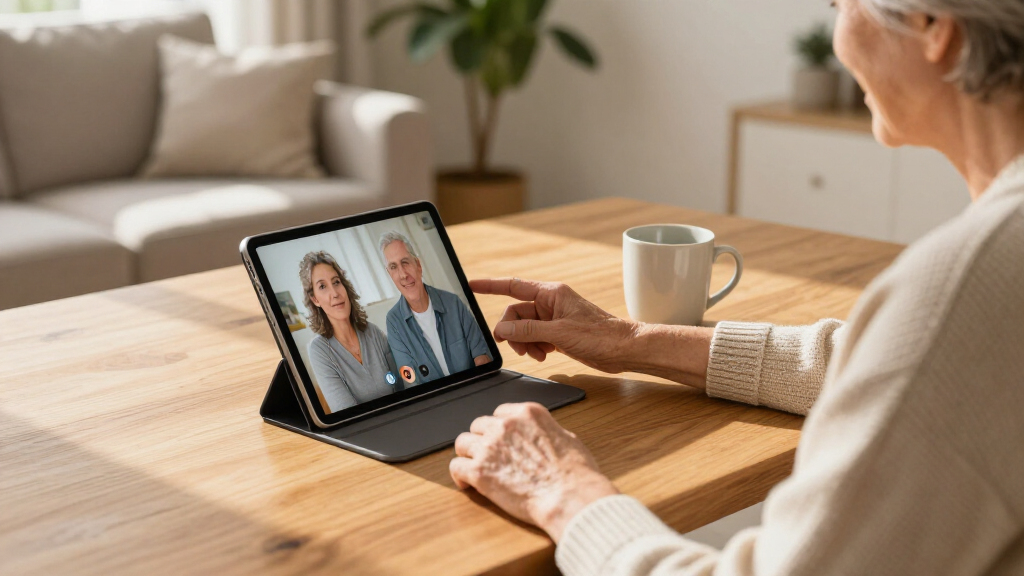

The best tablet stands for seniors make reading, video calls, and streaming easier by holding a screen at a comfortable angle without requiring a firm grip. My best overall pick is the Orlian Adjustable Aluminum Tablet Stand, whose rotating base and adjustable design suit everyday desk use. For bed viewing, the BluuSuuk floor stand offers an extended arm and weighted base, while the Lamicall Tablet Pillow Stand is a softer, portable choice for lap use. The main tradeoff is between the stability and reach of floor stands, the compactness of desk stands, and the comfort of pillow styles. Read on for the full breakdown and help matching a stand to the way you use your tablet.

Turn quiet afternoons into listening time
- Thousands of audiobooks, podcasts and originals
- Listen on your phone, tablet or Echo — also offline
- Cancel anytime
Complete the kit


Key Takeaways
- Rotating bases matter most at shared desks: Orlian and LOXP models make it easier to turn a screen toward another person without lifting the whole stand.
- Bed use calls for reach, not just adjustability: The BluuSuuk floor stand and Lamicall gooseneck mount can position a tablet above or beside a bed, but need a suitable setup space.
- Pillow stands favor comfort over precise positioning: Lamicall, KDD, and JSAUX options rest on a lap or soft surface, while desk stands provide a steadier, more fixed viewing angle.
- Foldable designs trade some heft for easier storage: LISEN‘s foldable desk stand suits users who want to put the stand away, unlike heavier-base models intended to stay set up.
- Tablet size and grip are deciding details: The Urmust‘s stated 4.7–15.6-inch range is unusually broad, while clamp and holder styles still require checking device fit and how easily the tablet can be placed or removed.
| Lamicall Tablet Pillow Stand with 6 Adjustable Viewing Angles |  | Best for Bed and Lap Viewing | Form factor: Pillow | Compatible device size: 4.7–13 inches | Viewing angles: 6 | VIEW LATEST PRICE | See Our Full Breakdown |
| BluuSuuk Tablet Floor Stand with Double Weight Base |  | Best for Hands-Free Bedside Viewing | Mounting type: Floor stand | Height range: 12–57 inches | Maximum device weight: Less than 1.5 pounds | VIEW LATEST PRICE | See Our Full Breakdown |
| COOPER TabHolder Adjustable Tablet and Portable Monitor Stand |  | Best for Eye-Level Tabletop Use | Mounting type: Tabletop | Compatible devices: Tablets, e-readers, gaming consoles, and portable monitors up to 17 inches | Maximum device weight: 4.4 pounds | VIEW LATEST PRICE | See Our Full Breakdown |
| Orlian Adjustable Aluminum Tablet Stand with 360° Rotating Base |  | Best Lightweight Rotating Stand | Material: Aluminum alloy | Compatible device size: 5.8–12.9 inches | Rotation: 360 degrees horizontal | VIEW LATEST PRICE | See Our Full Breakdown |
| LOXP Adjustable 360° Rotating Tablet Stand with Heavy-Duty Base |  | Best for a Wide Range of Device Sizes | Material: Metal with silicone pads | Device size compatibility: Listed as 4.0–16.9 inches; description also states 4.7–16.9 inches | Maximum case thickness: 0.8 inches | VIEW LATEST PRICE | See Our Full Breakdown |
| Lamicall Adjustable Aluminum Tablet and Phone Stand |  | Best Overall Tabletop Stand | Compatible device size: 4–13 inches | Maximum device thickness: 18 mm (0.71 in) | Material: Aluminum alloy and steel | VIEW LATEST PRICE | See Our Full Breakdown |
| LISEN Foldable Adjustable Tablet Stand for Desk |  | Best for Fold-Away Desk Use | Compatible device size: 4.0–15.9 inches | Maximum device width: 0.7 inches | Supported phone mode: Landscape | VIEW LATEST PRICE | See Our Full Breakdown |
| KDD Foldable Tablet Pillow Stand with Storage Pocket and Stylus Holders | 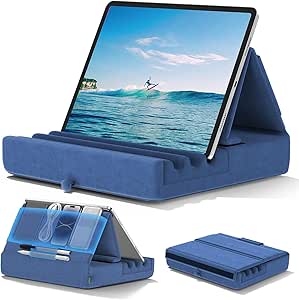 | Best for Bedside Storage | Compatible device size: 4.7–12.9 inches | Viewing angles: 3 | Material: High-elasticity sponge with plush polyester surface | VIEW LATEST PRICE | See Our Full Breakdown |
| JSAUX Tablet Pillow Stand for 4–11-Inch Devices, Navy Blue |  | Best Washable Pillow Stand | Form factor: Pillow | Compatible device size: 4–10.9 inches | Color: Navy blue | VIEW LATEST PRICE | See Our Full Breakdown |
| Adjustable Tablet and Phone Floor Stand with 5 lb Metal Base |  | Best for Hands-Free Seated or Reclined Viewing | Compatible device size: 4.7–11 inches | Maximum device weight: Less than 1.5 lb | Adjustable height: 27.5–55 inches | VIEW LATEST PRICE | See Our Full Breakdown |
| LISEN Aluminum Alloy Adjustable Tablet Stand |  | Best Compact Desktop Pick | Material: Aluminum alloy | Form factor: Tabletop | Compatible device size: 4.7–12.9 inches | VIEW LATEST PRICE | See Our Full Breakdown |
| Lamicall Gooseneck Tablet and Phone Holder for Bed |  | Best for Bedside Hands-Free Viewing | Compatible device size: 4.7–13 inches | Supported weight: Up to 800 g | Clamp thickness range: 0.2–3.15 inches (0.5–8 cm) | VIEW LATEST PRICE | See Our Full Breakdown |
| Tounee Adjustable Aluminum Tablet Stand, Gray |  | Best for Large Tablets | Compatible device size: 4.7–16.9 inches | Material: Aluminum alloy | Adjustability: Height and angle | VIEW LATEST PRICE | See Our Full Breakdown |
| SAMHOUSING Adjustable Rotatable Tablet Floor Stand | 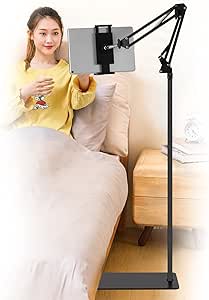 | Best Freestanding Bedside Stand | Compatible screen size: 4.7–13 inches | Compatible case width: 4.3–9.8 inches (11–24.8 cm) | Maximum case thickness: 0.63 inches (1.6 cm) | VIEW LATEST PRICE | See Our Full Breakdown |
| Urmust Tablet Stand for Desk – Adjustable iPad Holder for Bed (4.7″‑15.6″) |  | Best for Fine-Tuning Desk Position | Compatible devices: E-readers, smartphones, and tablets | Supported device weight: Up to 1.1 kg (2.42 lb) | Material: Aluminum | VIEW LATEST PRICE | See Our Full Breakdown |
| tablet stands for senior | Material | Compatible device size | Color |
|---|---|---|---|
| Lamicall Tablet Pillow Stand w | Fabric enclosure | 4.7–13 inches | Grey |
| BluuSuuk Tablet Floor Stand wi | — | — | — |
| COOPER TabHolder Adjustable Ta | — | — | Night Black |
| Orlian Adjustable Aluminum Tab | Aluminum alloy | 5.8–12.9 inches | — |
| LOXP Adjustable 360° Rotating | Metal with silicone pads | — | — |
| Lamicall Adjustable Aluminum T | Aluminum alloy and steel | 4–13 inches | Silver |
| LISEN Foldable Adjustable Tabl | ABS plastic with metal panel | 4.0–15.9 inches | Black |
| KDD Foldable Tablet Pillow Sta | High-elasticity sponge with plush polyester surface | 4.7–12.9 inches | Blue |
| JSAUX Tablet Pillow Stand for | — | 4–10.9 inches | Navy blue |
| Adjustable Tablet and Phone Fl | Carbon steel with reinforced base | 4.7–11 inches | — |
| LISEN Aluminum Alloy Adjustabl | Aluminum alloy | 4.7–12.9 inches | Black |
| Lamicall Gooseneck Tablet and | — | 4.7–13 inches | — |
| Tounee Adjustable Aluminum Tab | Aluminum alloy | 4.7–16.9 inches | Gray |
| SAMHOUSING Adjustable Rotatabl | Iron | — | — |
| Urmust Tablet Stand for Desk | Aluminum | — | Black |
More Details on Our Top Picks
Lamicall Tablet Pillow Stand with 6 Adjustable Viewing Angles
I’d put this pillow stand near the top for seniors who read or watch a tablet while reclining, since its soft base can rest on a bed, sofa, or lap without requiring a table. Six viewing angles and portrait or landscape positioning make it easier to find a comfortable view for reading, video calls, or shows. Its 4.7–13-inch compatibility also covers phones and many tablets. Compared with the BluuSuuk floor stand, it takes up less dedicated room and needs no assembly around a floor base, but it does not hold a screen suspended overhead. The tradeoff is that a pillow support can shift as it is repositioned, and the stand may need 6–24 hours to regain its shape after unpacking. I’d skip it for anyone who needs a fixed, hands-free position at a desk.
Pros:- Six viewing angles help adapt the screen for different reclining positions
- Works in portrait and landscape orientation
- Fits devices from 4.7 to 13 inches, including phones and many tablets
- Detachable pillowcase makes the fabric enclosure easier to remove for care
Cons:- May take 6–24 hours to regain its shape after unpacking
- A soft pillow base is less rigid than a weighted tabletop or floor stand
- Does not provide a suspended or fixed-height screen position
Best for: Seniors who use a tablet in bed or on a sofa and want a soft support they can move between lap and tabletop
Not ideal for: People who need a rigid, elevated screen position or plan to use the tablet while standing; a pillow stand rests on a nearby surface rather than holding the device overhead
- Form factor:Pillow
- Compatible device size:4.7–13 inches
- Viewing angles:6
- Orientation:Portrait and landscape
- Mounting locations:Bed, lap, sofa
- Material:Fabric enclosure
- Pillowcase:Detachable
- Color:Grey
Our verdict“Choose this stand for flexible, cushioned tablet viewing on a bed, sofa, or lap; choose a rigid stand if a steady elevated position matters more.”
BluuSuuk Tablet Floor Stand with Double Weight Base
For a senior who wants a screen held above a bed or recliner, the BluuSuuk offers a different kind of support from tabletop picks such as the COOPER TabHolder. Its floor base and arm place the device between 12 and 57 inches off the ground, while the 360-degree ball-head adjustment helps aim the screen without moving the chair or bed. The listed 6.6-pound base is heavier than the earlier base described in the product details, supporting a more stable setup, and the arm uses a double-support structure. The main compromise is space: this is a substantial floor stand, not a compact accessory to tuck into a drawer. It also has more parts and positioning adjustments than a simple tabletop holder, and device weight must stay below 1.5 pounds.
Pros:- Height adjustment from 12 to 57 inches supports a range of bed and chair positions
- 360-degree ball-head adjustment helps aim the screen
- 6.6-pound base and double-support arm are designed for stability
- Works with compatible phones and tablets for reading, video calls, and viewing
Cons:- Floor base takes up more space than a tabletop or pillow stand
- Device compatibility is limited to items under 1.5 pounds
- More involved positioning may be less convenient than a simple stand placed on a table
Best for: Seniors who read or watch a tablet while lying in bed or seated in a recliner and want the screen held off their lap
Not ideal for: People with limited floor space, frequent room-to-room use, or a tablet heavier than 1.5 pounds
- Mounting type:Floor stand
- Height range:12–57 inches
- Maximum device weight:Less than 1.5 pounds
- Base weight:6.6 pounds
- Angle adjustment:360-degree ball-head adjustment
- Arm structure:Double support
- Compatible devices:Phones, tablets, and other listed devices
- Item weight:8.4 pounds
Our verdict“Pick the BluuSuuk if you need a floor-based screen position beside a bed or recliner and have room for its weighted base.”
COOPER TabHolder Adjustable Tablet and Portable Monitor Stand
The COOPER TabHolder is the most height-focused tabletop option in this group: it raises a device from 7 to 10 inches and offers 270-degree tilt adjustment. For seniors who sit at a table for video calls, reading, or following instructions, that range can bring the screen closer to eye level and reduce the need to hunch over a flat tabletop stand. Its weighted metal base, non-slip padding, and broad padded holder aim to keep larger devices steady, including portable monitors up to 17 inches. Compared with the Orlian rotating stand, COOPER is built around height and tilt rather than 360-degree sharing between viewers. It also requires a flat surface and supports devices only up to 4.4 pounds, so it is not a floor-side solution or a universal fit for heavier screens.
Pros:- Telescoping height adjustment from 7 to 10 inches can raise the screen toward eye level
- 270-degree tilt gives flexibility for different seated viewing positions
- Weighted base and non-slip padding support a stable tabletop setup
- Padded holder and compatibility with devices up to 17 inches suit larger screens
Cons:- Requires a flat tabletop or similar surface
- Maximum supported device weight is 4.4 pounds
- Tilt range is less suited than a 360-degree rotating base for sharing the screen around a table
Best for: Seniors who use a tablet or compatible portable monitor at a desk or dining table and want adjustable screen height
Not ideal for: People who want a stand beside a bed or chair without a table, or who need support for devices heavier than 4.4 pounds
- Mounting type:Tabletop
- Compatible devices:Tablets, e-readers, gaming consoles, and portable monitors up to 17 inches
- Maximum device weight:4.4 pounds
- Height adjustment:7–10 inches
- Tilt adjustment:270 degrees
- Item weight:355 g
- Materials:ABS, aluminum, foam, metal, and silicone
- Color:Night Black
Our verdict“Choose COOPER for adjustable-height viewing at a table, especially if you use a larger tablet or portable monitor.”
Orlian Adjustable Aluminum Tablet Stand with 360° Rotating Base
I’d choose the Orlian for a senior who wants a portable stand that can be adjusted and turned toward another person without lifting the device. Its 360-degree horizontal rotation suits sharing photos or shifting between a reader and a companion, while the 90-degree vertical tilt helps set a more comfortable viewing angle. At 0.31 kg, it is easier to carry than the BluuSuuk floor stand, and its foldable aluminum design suits home, office, or travel use. The tradeoff is that this is still a tabletop stand: it cannot bring the screen over a bed or raise it as high as COOPER’s telescoping holder. Its 5.8-inch minimum also excludes some smaller phones, and the provided details do not specify a maximum device weight, so I would check device fit before relying on it with a heavier tablet.
Pros:- 360-degree horizontal rotation makes it easier to share the screen
- 90-degree vertical tilt helps adjust the viewing angle
- Foldable aluminum construction weighs 0.31 kg for easier carrying
- Anti-slip base is designed to keep the stand steady on a tabletop
Cons:- Requires a flat surface and does not position the screen over a bed
- Listed compatibility starts at 5.8 inches, excluding smaller devices
- Maximum supported device weight is not specified in the provided product data
Best for: Seniors who want a lightweight, foldable stand for a tablet or phone on a table and often turn the screen to share it
Not ideal for: People who need a bedside floor mount, a stand for devices smaller than 5.8 inches, or confirmed support for a heavy tablet
- Material:Aluminum alloy
- Compatible device size:5.8–12.9 inches
- Rotation:360 degrees horizontal
- Tilt:90 degrees vertical
- Dimensions:5.9 × 5 × 3 inches
- Weight:0.31 kg
- Mounting type:Tabletop
- Warranty:2 years
Our verdict“Pick Orlian for portable tabletop use and easy screen sharing, but choose a floor stand for bedside viewing or a model with a stated weight limit for heavier devices.”
LOXP Adjustable 360° Rotating Tablet Stand with Heavy-Duty Base
LOXP stands out for the breadth of devices it claims to accommodate, from smaller phones and e-readers to tablets and portable monitors. Its dual hinges adjust height and tilt, while the rotating base makes it easier to turn the screen toward someone else without lifting the device. That combination is useful for a senior who moves between reading, video calls, and shared viewing at a table. Compared with the Orlian, LOXP lists a wider device-size range and a maximum case thickness, but its compatibility details conflict: the minimum is given as both 4.0 and 4.7 inches. The weighted metal base and silicone pads support stability, though it remains a tabletop stand, not a bed mount. It also explicitly does not support laptops, so larger device size alone should not be taken as laptop compatibility.
Pros:- Dual hinges adjust height and tilt for different seated viewing positions
- 360-degree rotation helps turn the screen toward another viewer
- Weighted metal base and silicone pads support stability and surface protection
- Foldable construction is easier to transport or store than a fixed stand
Cons:- Product details conflict on the minimum compatible device size, listing both 4.0 and 4.7 inches
- Not designed for laptops
- Tabletop design does not hold a screen over a bed or beside a chair without a table
Best for: Seniors who use different phones, e-readers, or tablets and want one adjustable tabletop stand for shared viewing
Not ideal for: Laptop users, people seeking a bedside or floor stand, or buyers who need a clearly confirmed minimum device size
- Material:Metal with silicone pads
- Device size compatibility:Listed as 4.0–16.9 inches; description also states 4.7–16.9 inches
- Maximum case thickness:0.8 inches
- Rotation:360 degrees
- Adjustability:Adjustable height and tilt angle
- Mounting type:Tabletop
- Special features:Foldable, adjustable, swivel
- Laptop compatibility:Not designed for laptops
Our verdict“Choose LOXP if you want a foldable, rotating tabletop stand for several device types, but verify fit if your device is near the listed minimum size.”
Lamicall Adjustable Aluminum Tablet and Phone Stand
For seniors who want a steady, straightforward stand on a desk or table, this aluminum-and-steel Lamicall is my most balanced pick. Its angle adjustment and portrait-or-landscape support make it easier to set a screen for reading, video calls, or recipes without having to hold the device. Rubber pads help reduce slipping and scratches, while the compact tabletop footprint avoids the reach and setup demands of the adjustable floor stand in this group. The tradeoff is that it is a fixed tabletop solution, not a stand for watching from bed or across a room. Case thickness also matters: devices must fit within the 18 mm hook limit. For larger tablets, the product guidance favors landscape use for better stability, so I would skip it if portrait viewing is essential on a large device.
Pros:- Supports portrait and landscape viewing for calls, reading, and video.
- Adjustable angle helps position the screen for comfortable tabletop use.
- Rubber pads help keep the device from slipping and protect its surface.
- Works with compatible devices from 4 to 13 inches.
Cons:- The 18 mm device-thickness limit can rule out some protective cases.
- Larger tablets are advised to be used horizontally for better stability.
- Tabletop mounting does not bring the screen to a seated or reclined user.
Best for: Seniors who use a phone or tablet at a table and want adjustable viewing in either orientation.
Not ideal for: People who need a stand beside a bed or chair, or who use a bulky case thicker than 18 mm at the holder hook.
- Compatible device size:4–13 inches
- Maximum device thickness:18 mm (0.71 in)
- Material:Aluminum alloy and steel
- Viewing orientation:Portrait and landscape
- Mounting type:Tabletop
- Dimensions:5 × 5.5 × 4.5 inches
- Weight:8.81 ounces
- Color:Silver
Our verdict“Choose this Lamicall for versatile, adjustable viewing at a table; choose a floor or pillow stand if you need the screen closer while seated or lying down.”
LISEN Foldable Adjustable Tablet Stand for Desk
The fold-flat design makes this LISEN a practical choice for seniors who want a stand they can put away after a video call or reading session. Height and angle adjustment can bring the screen into a more comfortable position than the compact Lamicall tabletop stand, and the included screw lets users tighten the tension if the holder feels loose. Its support for devices up to 15.9 inches gives it a broader stated size range than that Lamicall, though fit still depends on the device and case staying within the listed 0.7-inch width limit. The main compromise is phone orientation: phones are supported only in landscape. The plastic-and-metal construction and 15.2-ounce weight also make it less compact than a simple tabletop holder, despite its folding form.
Pros:- Folds flat for storage or travel between rooms.
- Adjustable height and angle help position the screen on a desk.
- Holder tension can be adjusted with the included screw.
- Nonslip silicone helps stabilize the device and stand.
Cons:- Phones are supported only in landscape orientation.
- Cases wider than 0.7 inches are not supported.
- At 15.2 ounces, it is heavier than the Lamicall tabletop stand.
Best for: Seniors with limited desk storage who want adjustable height and angle for a compatible tablet and can use a phone in landscape.
Not ideal for: People who need portrait phone viewing or whose device and case exceed the 0.7-inch width limit.
- Compatible device size:4.0–15.9 inches
- Maximum device width:0.7 inches
- Supported phone mode:Landscape
- Material:ABS plastic with metal panel
- Dimensions:5.28 × 1.42 × 7.28 inches
- Weight:15.2 ounces
- Color:Black
- Adjustment:Adjustable height and viewing angle
Our verdict“Pick the LISEN if fold-away storage and adjustable height matter more than portrait phone support or the lightest possible tabletop setup.”
KDD Foldable Tablet Pillow Stand with Storage Pocket and Stylus Holders
This KDD pillow stand suits seniors who watch or read from a bed or sofa and want their small accessories close at hand. The soft plush surface and three viewing angles offer a more relaxed setup than either desk stand in this group, while its deep device groove helps keep a tablet in place. A large pouch and two pen pockets give it a useful organizing role for glasses, a stylus, or small reading accessories. Compared with the JSAUX pillow stand, the KDD lists a larger maximum device size, but its compatibility details vary between the description and specifications; I would verify fit before buying for a tablet near the upper limit. The plush finish may also need occasional cleaning, and a pillow-style stand is less suited to users who want a rigid, height-adjustable screen position.
Pros:- Three viewing angles support hands-free use in bed, on a sofa, or at a desk.
- Soft pillow construction is more comfortable on a lap than a rigid stand.
- Large pouch and two pen pockets keep small accessories nearby.
- Wide, deep groove helps hold a compatible device in position.
Cons:- Device compatibility details vary between the description and specifications.
- Plush fabric may need occasional cleaning.
- Does not provide the height adjustment of the LISEN desk stand.
Best for: Seniors who read or watch from bed or a sofa and want a soft stand with pockets for a stylus and small essentials.
Not ideal for: Buyers who need a rigid, height-adjustable desk stand or require clearly confirmed compatibility near the listed size limit.
- Compatible device size:4.7–12.9 inches
- Viewing angles:3
- Material:High-elasticity sponge with plush polyester surface
- Storage:1 large pouch and 2 pen pockets
- Dimensions:11 × 11.02 × 2.7 inches
- Weight:15.84 ounces
- Color:Blue
- Mounting type:Tabletop
Our verdict“Choose the KDD for soft, pocket-equipped viewing from a bed or sofa, after confirming your device fits the stated range.”
JSAUX Tablet Pillow Stand for 4–11-Inch Devices, Navy Blue
For seniors who prefer reading or video calls from a bed or sofa, the JSAUX pairs a foldable pillow shape with a removable washable cover—a helpful difference if the stand gets regular use around meals, pets, or household dust. Its stated range covers tablets, e-readers, and phones up to 10.9 inches, so it is more limited than the KDD pillow stand’s listed 12.9-inch maximum. In return, the JSAUX offers a clear care advantage and includes a mesh pocket and pencil holder for small accessories. Multi-angle viewing adapts to different reclined positions, but it will not raise a screen to the seated eye level the LISEN desk stand can provide. Buyers should check their device size against the listed range before choosing it.
Pros:- Removable washable cover makes routine cleaning easier.
- Multi-angle viewing supports different bed and sofa positions.
- Foldable, lightweight form is easy to move or store.
- Mesh pocket and pencil holder provide places for small accessories.
Cons:- The listed 10.9-inch maximum excludes some larger tablets that fit the KDD’s stated range.
- Pillow construction does not offer rigid height adjustment.
- Device fit is limited to the stated size range.
Best for: Seniors who use a smaller tablet, e-reader, or phone in bed or on a sofa and want a cover they can remove and wash.
Not ideal for: People with tablets larger than 10.9 inches or those who need a rigid stand with adjustable height at a desk.
- Form factor:Pillow
- Compatible device size:4–10.9 inches
- Color:Navy blue
- Weight:0.29 kg
- Features:Multi-angle viewing, foldable design, mesh pocket, pencil holder, removable washable cover
- Mounting locations:Bed, sofa, tabletop
- Cover:Removable and washable
Our verdict“Choose the JSAUX for smaller devices and easy cover care when a soft bed-or-sofa stand is more useful than desk-height adjustment.”
Adjustable Tablet and Phone Floor Stand with 5 lb Metal Base
This floor stand is the pick for seniors who want a screen positioned beside a chair or bed without balancing a tablet on a lap or table. Its 27.5–55-inch height range and rotating holder can help align the display while seated or lying down, a different use case from the Lamicall and LISEN tabletop stands. The 5 lb reinforced base provides a freestanding setup, and installation requires no tools. The tradeoff is stability: compatible devices must weigh less than 1.5 lb, and heavier tablets or cases may require extra weight on the base. It also takes more floor space and is less convenient to reposition than either pillow stand. I would choose it for a dedicated viewing spot, not as a compact stand to move between tables.
Pros:- Adjustable height can position the screen for seated or reclined viewing.
- 360-degree holder rotation supports different viewing orientations.
- Freestanding design keeps the device off a lap or bedside table.
- Tool-free installation and fold-down storage simplify setup and packing.
Cons:- Devices must weigh less than 1.5 lb.
- Heavier devices or cases may need extra weight on the base for stability.
- Requires floor space and is less portable in use than the pillow stands.
Best for: Seniors who watch or video-call from a favorite chair or bed and need a screen positioned independently of a tabletop.
Not ideal for: People with devices weighing 1.5 lb or more, limited floor space, or a need for a compact stand they can carry room to room.
- Compatible device size:4.7–11 inches
- Maximum device weight:Less than 1.5 lb
- Adjustable height:27.5–55 inches
- Holder rotation:360 degrees
- Base weight:5 lb
- Material:Carbon steel with reinforced base
- Form factor:Adjustable tablet floor stand
Our verdict“Choose this floor stand for hands-free viewing beside a chair or bed if your device stays under the weight limit and you can dedicate floor space to it.”
LISEN Aluminum Alloy Adjustable Tablet Stand
For seniors who want a stand that can move between a desk and a travel bag, I’d favor this foldable aluminum tabletop model. Its 360-degree rotation and adjustable height and angle make it easier to set a screen at a comfortable position for reading or video calls, while the weighted, non-slip base helps keep it planted during ordinary touch use. It supports devices from 4.7 to 12.9 inches, a narrower range than the Tounee Adjustable Aluminum Tablet Stand, which accommodates larger screens. The LISEN’s 0.42 kg weight and foldable design make it the more portable choice, though its tabletop format won’t bring a screen up beside a bed or sofa the way the SAMHOUSING floor stand can. Check your device size before buying; compatibility is limited to the stated range.
Pros:- Folds for storage or travel
- Height and angle adjustments help position the screen for comfortable viewing
- 360-degree rotation supports changing the viewing direction
- Weighted, non-slip base helps steady the stand on a desk
Cons:- Does not raise a tablet from the floor beside a bed or sofa
- Device compatibility stops at 12.9 inches
- Smartphones are supported only in landscape orientation
Best for: Seniors who want a portable tabletop stand for a phone or standard-size tablet and need adjustable screen positioning at a desk.
Not ideal for: People who need a bedside floor stand, use a tablet larger than 12.9 inches, or want a supported smartphone portrait orientation.
- Material:Aluminum alloy
- Form factor:Tabletop
- Compatible device size:4.7–12.9 inches
- Rotation:360 degrees
- Features:Adjustable, foldable, portable, non-slip base
- Item weight:0.42 kg
- Color:Black
Our verdict“Choose the LISEN for portable, adjustable desk viewing; pick the Tounee if your tablet is larger than 12.9 inches.”
Lamicall Gooseneck Tablet and Phone Holder for Bed
I’d choose this clamp-on gooseneck holder for seniors who want a screen suspended near the bed or chair rather than resting on a table. Its clamp fits flat surfaces from 0.2 to 3.15 inches thick, and the padded contact points help protect the furniture while holding phones and tablets from 4.7 to 13 inches. The 360-degree rotating holder supports portrait or landscape positioning, a useful difference from the LISEN stand, whose listed smartphone support is landscape-only. The tradeoff is that the reinforced arm takes effort to reposition, and some wobble during screen touches is normal. Unlike the SAMHOUSING floor stand, this model needs a suitable edge to clamp onto; it is not a freestanding option for every bedside setup.
Pros:- Clamp attaches to surfaces 0.2–3.15 inches thick
- Supports phones and tablets from 4.7 to 13 inches
- Rotating holder supports portrait and landscape viewing
- Padded clamp contact points help prevent scratches and scuffs
Cons:- Arm takes moderate effort to reposition
- Some movement during screen touches is normal
- Requires a suitable flat surface edge rather than standing independently
Best for: Seniors who read or make video calls in bed and have a sturdy, flat edge available for clamping.
Not ideal for: People who frequently change screen position, need a wobble-free surface for typing, or lack a compatible clamp edge.
- Compatible device size:4.7–13 inches
- Supported weight:Up to 800 g
- Clamp thickness range:0.2–3.15 inches (0.5–8 cm)
- Rotation:360 degrees
- Arm material:Aluminum
- Padding:Non-slip TPE
Our verdict“Choose this Lamicall holder for hands-free bedside viewing when you have a secure edge to clamp onto.”
Tounee Adjustable Aluminum Tablet Stand, Gray
The Tounee is my pick for seniors using a larger tablet who still want a straightforward stand for a desk or table. Its 4.7–16.9-inch compatibility range goes beyond the LISEN’s 12.9-inch limit, making it better suited to oversized tablets and portable monitors. Height and angle adjustments let the screen sit in a more comfortable viewing position, while the weighted base and silicone pads help reduce slipping and protect the desk. It also folds flat for storage. That broad device support comes with a clear boundary: the stand is not designed for laptops, and its tabletop form won’t bring the screen alongside a bed like the Lamicall gooseneck holder or SAMHOUSING floor stand. I’d choose it for a stable desk setup, not for a laptop or bedside mounting solution.
Pros:- Supports devices from 4.7 to 16.9 inches
- Adjustable height and angle help tailor desk viewing
- Weighted base and silicone pads help limit slipping and protect surfaces
- Folds flat for storage or travel
Cons:- Not designed for laptops
- Tabletop-only format does not position a screen beside a bed
- Larger device compatibility may be unnecessary for users with only a phone or small tablet
Best for: Seniors who use a large tablet or portable monitor at a desk and want adjustable height and angle.
Not ideal for: Laptop owners or anyone who needs a floor-standing or clamp-on holder beside a bed.
- Compatible device size:4.7–16.9 inches
- Material:Aluminum alloy
- Adjustability:Height and angle
- Mounting type:Tabletop
- Foldable:Yes
- Dimensions:7 × 2 × 2 inches
- Laptop compatible:No
- Color:Gray
Our verdict“Pick the Tounee when large-screen compatibility matters more than bedside mounting or laptop support.”
SAMHOUSING Adjustable Rotatable Tablet Floor Stand
For seniors who want a screen positioned beside a bed or sofa without clamping onto furniture, I’d look first at the SAMHOUSING floor stand. Its height adjusts from 27.5 to 53 inches, and the bracket rotates 360 degrees, so the screen can be brought closer and turned for a preferred viewing direction. It supports 4.7–13-inch devices, with stated limits for case width and thickness, so a bulky case may not fit. Compared with the Lamicall gooseneck holder, it does not depend on a bedframe or table edge, and its folding arm and tool-free assembly keep setup simple. Its stability still depends on alignment: the base may need extra weight if the arm is not positioned over it. This is a floor-positioning solution, not the compact desk stand I’d choose for travel.
Pros:- Height adjusts from 27.5 to 53 inches for bedside or sofa viewing
- 360-degree rotating bracket allows flexible screen orientation
- Tool-free assembly and folding arm simplify setup and storage
- Reinforced metal base and double-support arm are designed for stability
Cons:- Base may need extra weight if the arm and base are not aligned
- Case width and thickness must fit the stated bracket limits
- Freestanding design is less portable than a foldable tabletop stand
Best for: Seniors who watch or read from a bed or sofa and want a freestanding screen position without clamping to furniture.
Not ideal for: People who need a compact tabletop stand, have a device case outside the listed fit limits, or cannot manage occasional base adjustment.
- Compatible screen size:4.7–13 inches
- Compatible case width:4.3–9.8 inches (11–24.8 cm)
- Maximum case thickness:0.63 inches (1.6 cm)
- Height range:27.5–53 inches
- Rotation:360 degrees
- Weight:1.4 kg
- Material:Iron
- Warranty:2 years
Our verdict“Choose the SAMHOUSING for adjustable, freestanding viewing beside a bed or sofa, provided its case limits fit your device.”
Urmust Tablet Stand for Desk – Adjustable iPad Holder for Bed (4.7″‑15.6″)
The Urmust is aimed at seniors who want more control over screen placement on a desk or table: it offers adjustable height, angle, and 360-degree rotation, plus cable clips for a tidier charging setup. Its stated 1.1 kg capacity covers many phones and tablets, while the aircraft-grade aluminum construction gives it a sturdier desktop role than the lightweight, foldable LISEN. The tradeoff is portability: at 0.92 kg and roughly 12 by 9 inches, it is considerably bulkier than the LISEN’s 0.42 kg design. It also is not suitable for headboard mounting, and the listed weight limit rules out heavier tablets. Compared with the Tounee, Urmust’s cable clips and broad rotation are useful desk details, but the Tounee supports devices up to 16.9 inches.
Pros:- Height, angle, and 360-degree rotation offer flexible screen positioning
- Aluminum construction supports devices up to 1.1 kg
- Integrated cable clips help keep charging cables organized
- Tool-free assembly with the included wrench
Cons:- Not suitable for headboard use
- May wobble on uneven surfaces
- Relatively bulky and limited to devices weighing no more than 1.1 kg
Best for: Seniors who keep a phone or tablet on a desk, want flexible positioning and cable management, and do not need a travel-light stand.
Not ideal for: People seeking a headboard-mounted holder, a compact travel stand, or support for tablets heavier than 1.1 kg.
- Compatible devices:E-readers, smartphones, and tablets
- Supported device weight:Up to 1.1 kg (2.42 lb)
- Material:Aluminum
- Adjustability:Height, angle, and 360-degree rotation
- Item dimensions:12.01 × 8.86 × 2.76 inches
- Item weight:0.92 kg
- Warranty:18 months
- Color:Black
Our verdict“Choose Urmust for a feature-rich adjustable desk setup, but select the lighter LISEN if portability matters more.”

How We Picked
I compared these stands through the needs that shape everyday senior use: comfortable viewing height and angle, how securely a device is held, how easily a stand can be adjusted, and whether it fits a bed, chair, lap, or desk. I also weighed setup effort, portability, base stability, device-size compatibility, and whether the design is likely to make routine tasks—such as setting a tablet down for a video call—simpler rather than more fiddly.
The ranking favors stands that offer a useful balance of stability, simple positioning, and everyday versatility. Desk stands rank well for reliable, close-at-hand use; floor and bed mounts earn their place when their extra reach solves a specific comfort problem; pillow stands suit relaxed lap viewing but offer less exact positioning. I distinguish models by their stated designs and intended use, and I treat features such as weighted bases and broad size compatibility as benefits with practical tradeoffs, not guarantees of fit for every tablet or setting.
Factors to Consider When Choosing Tablet Stands For Seniors
Before choosing a stand, think about where the tablet will usually be used and how much repositioning feels comfortable. A stand that works well on a desk may be awkward beside a bed, while a flexible arm may take more effort to adjust than a simple tabletop holder.
Match the Stand to the Main Viewing Location
Start with the chair, bed, or table where the tablet gets the most use; choosing by appearance or advertised flexibility alone can lead to a stand that never feels convenient. Desk stands keep a screen near the user’s hands and work well for reading, browsing, and video calls. Floor stands can bring a screen closer to a recliner or bed, but need clear floor space and a stable place for the base. Pillow styles are easier to move between rooms, though a lap or cushion may shift under the tablet. If the tablet needs to be shared with a visitor, a rotating tabletop base may be simpler than moving a whole floor stand.
Choose Adjustments That Are Easy to Make
More joints and adjustment points can help tailor a viewing angle, but they can also make setup less straightforward. Consider whether the user can comfortably reach the controls and move the tablet without straining a wrist or shoulder. A simple tilt adjustment may be enough for someone who uses one chair and one table. A height-adjustable arm is more useful when the tablet must move between seated and reclined positions. If possible, check whether the stand can be repositioned with the tablet in place, since removing and reinstalling a device for every angle change can become tiresome.
Prioritize Stability for Touchscreen Use
A stand can hold a tablet securely yet still wobble when the screen is tapped, so think about how often the user interacts with the display. A heavier or wider base can help a floor or desk stand stay put, but it may be harder to lift and store. Flexible arms offer convenient reach, but their position and firmness affect how steady the screen feels during touch input. For users with less hand strength or limited dexterity, a stable stand can reduce the need to brace the tablet with one hand. Leave enough room around the base or clamp so the stand does not crowd a bedside table or interfere with getting in and out of a chair.
Check Device Fit Before Ordering
Tablet dimensions, case thickness, and the way a holder grips its device all affect compatibility. A stand’s stated screen-size range is a useful starting point, but it does not always tell you whether a bulky protective case will fit. Measure the tablet with its case on and compare that measurement with the holder’s supported dimensions where available. Think about how the device is inserted and released, especially if the user has limited finger strength. If more than one family member will use the stand, choose a design that can accommodate their devices without a difficult clamp adjustment.
Balance Comfort, Portability, and Storage
Portability matters when the stand needs to move from a bedroom to a living room, but a lighter design may give up some stability. Foldable desk stands are easier to put away and can suit a shared table; pillow stands are easy to carry and soft against the lap. A larger floor stand can improve reach, yet it takes more room and is less convenient to relocate. Think about where the stand will live between sessions, not only where it will be used. A product that is easy to store, set up, and return to its usual spot may be a better daily fit than one with more adjustment options than the user needs.
Spend More Only for a Feature That Solves a Real Problem
A premium or more elaborate stand makes sense when its build, reach, or adjustment range addresses a specific need, such as watching from bed without holding a tablet. For straightforward reading at a table, a basic adjustable desk stand may be easier to manage and take up less room. Avoid paying for a long arm if the tablet will remain in one position, or choosing a compact model if it leaves the screen too low for comfortable viewing. Think about the cost of setup effort too: a stand that takes repeated adjustments may be a poor match even if it offers many positions. Prioritize the feature that will improve daily use, rather than the longest list of features.
Frequently Asked Questions
Is a floor stand or a desk stand better for using a tablet in bed?
A floor stand is usually the better fit when the tablet needs to sit over or beside the bed without resting on the user. It offers more reach than a tabletop holder, but takes floor space and may need repositioning when the bed or chair changes. A gooseneck holder can also bring a screen close, though flexible arms may move when touched. A desk stand can work on a bedside table if the screen stays within comfortable reach. Choose based on where the base can sit safely and whether the tablet needs to be touched often.
Will a tablet stand work with a protective case?
Sometimes, but compatibility depends on the stand’s holder dimensions and how thick the case is. Check the tablet’s measurements with the case attached rather than relying only on the screen-size range. A clamp-style holder may have less room for a rugged case, while an open stand may simply support the device along its edges. Also check whether buttons, charging ports, or a stylus slot remain accessible once the tablet is in place. If the product details do not clarify case fit, contact the seller before ordering.
Are pillow stands a good choice for someone with limited hand strength?
A pillow stand can reduce the effort of holding a tablet, and its soft, portable form can be comfortable for relaxed viewing. It is not always the best choice for frequent tapping because the tablet and cushion may shift together. Someone who relies on the screen for video calls, reading, or hands-free viewing may prefer a firmer desk stand or a securely positioned floor mount. Consider whether the user can lift and reposition the pillow easily. The right choice depends on whether comfort on the lap or steady touchscreen use matters more.
What should I prioritize if the tablet is mainly for video calls?
Prioritize a stable position near eye level, a viewing angle that keeps the user’s face visible, and enough space to reach the screen controls. A rotating base can help when another person joins the conversation, while a floor or bed mount can keep the screen in view from a reclined position. Check whether the stand wobbles when the screen is tapped to answer or end a call. The tablet’s camera placement also matters: a stand should not block it or force the screen to sit at an awkward angle. A simple stand that stays set up in the usual call location can be easier than a highly adjustable one that needs frequent setup.
Should I choose a stand with many adjustment points or a simpler design?
Choose more adjustment range only when the tablet needs to move between different heights, seats, or viewing positions. A simple tabletop stand can be easier to operate for someone who uses the tablet in one regular spot. Multiple joints can improve reach, but they may take more effort to set and may shift if the stand is not firm. Think about who will adjust the stand and how often, rather than treating the largest number of positions as automatically better. When possible, favor controls the user can reach and operate without lifting the tablet out of its holder.
Conclusion
For most users who want one dependable stand for everyday table use, I recommend the Orlian Adjustable Aluminum Tablet Stand as the best overall choice, with its rotating base adding useful flexibility. The best value for relaxed lap viewing is the Lamicall Tablet Pillow Stand, while the best premium-style pick for bed use is the BluuSuuk floor stand for its extended arm and weighted base. Beginners who want a straightforward tabletop setup should start with the LISEN Foldable Adjustable Tablet Stand; those who need a stand beside a bed can compare the BluuSuuk with the Lamicall gooseneck holder based on available space and how often they tap the screen. For portability, look at a pillow or foldable model; for a shared desk, favor a rotating base. My final choice would be the stand that fits the user’s usual seat, device case, and comfort with adjustments—not simply the one with the most moving parts.
Halloween Picks
halloween
As an affiliate, we earn on qualifying purchases.