The best smart senior home devices help older adults stay connected and make it easier for caregivers to respond, but no single device covers every need. I rank the Nomo Smart Care Medical Alert System as the best overall for combining fall detection with a home-focused alert setup. The JubileeTV Remote Care System stands out for remote support, while the SecuLife SOS Medical Alert Wristband suits people who want a wearable alert option. The main tradeoffs are whether support should work at home or on the go, how much setup a household can manage, and whether a device needs an app, Wi-Fi, or a cellular connection. Read on for the full comparison and guidance on choosing the right fit.

Turn quiet afternoons into listening time
- Thousands of audiobooks, podcasts and originals
- Listen on your phone, tablet or Echo — also offline
- Cancel anytime
Complete the kit


Key Takeaways
- The strongest choice depends on where help is needed: wearable medical alerts suit mobility outside the home, while call buttons, pagers, and floor mats focus on getting help inside it.
- Nomo earns the overall lead for a home-centered alert approach with fall detection; it is not a substitute for a wearable that can call for help away from home.
- JubileeTV and SYMYNELEC solve a different problem from emergency alerts: they support remote communication, so they make more sense when regular contact matters more than fall response.
- Wi-Fi app systems trade convenience for connectivity dependence: TurboSense and DAYTECH can notify caregivers remotely, but households should check network coverage and phone notification settings.
- The lineup separates into focused tools rather than all-in-one replacements: the iHealth Track measures blood pressure, Echo Dot supports voice interaction, and call-button systems summon help without providing medical monitoring.
| SecuLife SOS Medical Alert Wristband with Fall Detection |  | Best for Simple Wearable SOS | Connectivity: Cellular | Safety features: Fall alerts, GPS tracking, geofencing, SOS, two-way calling | Battery capacity: 680 mAh | VIEW LATEST PRICE | See Our Full Breakdown |
| SecuLife Medical Alert Pendant for Seniors with Fall Detection, GPS Tracking, and Two-Way Calling |  | Best for Longer Battery Life | Connectivity: 4G LTE cellular | Safety features: Fall alerts, GPS tracking, geofencing, SOS button, two-way calling | Water resistance: IP67 | VIEW LATEST PRICE | See Our Full Breakdown |
| Fajocru Fall Detection Smart Watch for Seniors with GPS and SOS Alerts |  | Best for Health and Activity Tracking | Operating system: Android Wear 1.0 | Connectivity: 4G cellular | GPS: Built-in GPS with geofencing | VIEW LATEST PRICE | See Our Full Breakdown |
| Amazon Echo Dot (5th Gen) Smart Speaker with Alexa, Charcoal |  | Best for Hands-Free Home Routines | Generation: 5th Gen | Dimensions: 3.9 x 3.9 x 3.5 inches | Weight: 10.7 oz | VIEW LATEST PRICE | See Our Full Breakdown |
| SYMYNELEC Elderly Monitoring Camera with Screen and One-Touch Video Calling |  | Best for Family Video Check-Ins | Screen size: 2.8 inches | Video resolution: 1080p | Use: Indoor | VIEW LATEST PRICE | See Our Full Breakdown |
| TurboSense Caregiver Alert System with Wi-Fi App Notifications |  | Best for Flexible Wear Options | Brand: TurboSense | Connectivity: 2.4GHz Wi-Fi and 433MHz signal | Maximum range: Up to 656 ft (200 m) in open areas | VIEW LATEST PRICE | See Our Full Breakdown |
| DAYTECH Wi-Fi Caregiver Call Button System with App Alerts |  | Best for Shared Family Alerts | Brand: DAYTECH | Model: CR02TY-CT02WR-WB06WH | Connectivity: 2.4GHz Wi-Fi | VIEW LATEST PRICE | See Our Full Breakdown |
| PRNBRH Senior Medical Alert System with App, Panic Buttons, Waterproof Wristband, and Receiver |  | Best for Local Alerts During Internet Outages | Brand and model: PRNBRH CF106 | Included items: Two panic buttons, one wristband remote, one receiver | Wi-Fi: 2.4GHz only | VIEW LATEST PRICE | See Our Full Breakdown |
| Fajocru Senior Safety Smartwatch with Fall Detection, 4G GPS, SOS Alerts, and Video Calling |  | Best for Mobile Safety and Fall Detection | Operating system: Android Wear 1.0 | Connectivity: 4G cellular | Display: 1.56-inch AMOLED touchscreen | VIEW LATEST PRICE | See Our Full Breakdown |
| Wireless Caregiver Pager with Call Button and Receiver |  | Best for Long-Range, No-App Home Alerts | Brand: STECHRO | Included components: One call button and one receiver | Wireless range: Up to 1,500 feet | VIEW LATEST PRICE | See Our Full Breakdown |
| iHealth Track Smart Upper Arm Blood Pressure Monitor with Wide-Range Cuff |  | Best for At-Home Blood Pressure Tracking | Measurement location: Upper arm | Cuff fit: 8.7–16.5 in (22–42 cm) arm circumference | On-device storage: Up to 99 readings | VIEW LATEST PRICE | See Our Full Breakdown |
| Nomo Smart Care Medical Alert System with Fall Detection |  | Best for Whole-Home Fall Alerts | Included components: Smart Hub, two Satellite range extenders, wearable Tags | Connectivity: Wireless Wi-Fi | Power source: AC power with battery backup | VIEW LATEST PRICE | See Our Full Breakdown |
| Smart Caregiver Wireless Floor Mat Alarm and Pager System | 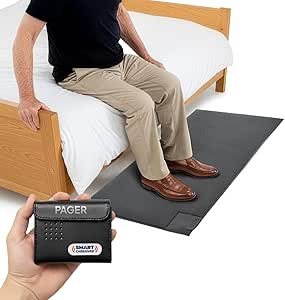 | Best for Bedside Caregiver Alerts | Mat dimensions: 48 × 24 × 0.5 in | Wireless range: Up to 300 ft | Alert options: Audible or vibration | VIEW LATEST PRICE | See Our Full Breakdown |
| JubileeTV Remote Care System for Seniors |  | Best for Family TV-Based Care | Connectivity: Bluetooth, infrared, and Wi-Fi | Compatible devices: Television, set-top box, streaming device, DVD/Blu-ray player | Maximum supported devices: 4 | VIEW LATEST PRICE | See Our Full Breakdown |
| Seculife Medical Alert Smartband for Seniors, White |  | Best for Mobile GPS Safety | Display size: 2 in | Battery capacity: 680 mAh | Listed battery life: 1 day | VIEW LATEST PRICE | See Our Full Breakdown |
| smart senior home device | Connectivity |
|---|---|
| SecuLife SOS Medical Alert Wri | Cellular |
| SecuLife Medical Alert Pendant | 4G LTE cellular |
| Fajocru Fall Detection Smart W | 4G cellular |
| Amazon Echo Dot | — |
| SYMYNELEC Elderly Monitoring C | 2.4 GHz Wi-Fi |
| TurboSense Caregiver Alert Sys | 2.4GHz Wi-Fi and 433MHz signal |
| DAYTECH Wi-Fi Caregiver Call B | 2.4GHz Wi-Fi |
| PRNBRH Senior Medical Alert Sy | — |
| Fajocru Senior Safety Smartwat | 4G cellular |
| Wireless Caregiver Pager with | — |
| iHealth Track Smart Upper Arm | Bluetooth 4.0 or later |
| Nomo Smart Care Medical Alert | Wireless Wi-Fi |
| Smart Caregiver Wireless Floor | — |
| JubileeTV Remote Care System f | Bluetooth, infrared, and Wi-Fi |
| Seculife Medical Alert Smartba | Built-in GPS and two-way calling |
More Details on Our Top Picks
SecuLife SOS Medical Alert Wristband with Fall Detection
This screen-free wristband keeps its main task straightforward: the wearer presses one button to call preset contacts, while fall detection can send an alert automatically. GPS tracking and geofencing add a way for caregivers to check location and receive boundary alerts, making it more useful for someone who still goes out alone than a home-only call button such as the Wireless Caregiver Pager. Two-way calling also lets the wearer speak through the device rather than find a phone. The tradeoff is its one-day listed battery life, which calls for a daily charging routine, plus a required monthly subscription for service. Compared with the SecuLife pendant, this wristband is the more compact, screen-free choice, but the pendant’s longer stated battery life may suit people who prefer fewer charging interruptions.
Pros:- One-button calls to preset emergency contacts
- Fall detection can send alerts automatically
- GPS tracking and geofencing support caregiver location monitoring
- IP67 water resistance supports wearing it in wet conditions
Cons:- Listed average battery life is one day, so frequent charging is part of ownership
- Cellular service requires a monthly subscription
Best for: Seniors who want a simple wrist-worn SOS device with location alerts and can follow a daily charging routine
Not ideal for: People who may forget daily charging or want an alert device without a recurring service subscription
- Connectivity:Cellular
- Safety features:Fall alerts, GPS tracking, geofencing, SOS, two-way calling
- Battery capacity:680 mAh
- Average battery life:1 day
- Water resistance:IP67
- Compatible devices:Android and iOS smartphones
- Warranty:1 year
- Subscription:$25 per month
Our verdict“Choose this wristband for simple, location-aware SOS access if daily charging and a monthly service plan fit the wearer’s routine.”
SecuLife Medical Alert Pendant for Seniors with Fall Detection, GPS Tracking, and Two-Way Calling
The SecuLife pendant brings fall detection, SOS calling, GPS, and geofence alerts into one wearable, but its strongest distinction from the SecuLife SOS Wristband is longer battery life: the listing says up to six days, while specifications give a five-day average. That can mean fewer charging interruptions for someone who needs the device available throughout the day and night. Its display shows time, battery, and signal, offering a quick status check that the screen-free wristband does not provide. Hands-free auto-answer and two-way calling can help when pressing a button is difficult. Like the wristband, it depends on a monthly subscription, and the conflicting battery estimates make planning less certain. Compared with the Fajocru Fall Detection Smart Watch, this pendant is more focused on emergency communication than activity and health tracking.
Pros:- Fall detection, SOS, GPS tracking, and geofence alerts in one wearable
- Longer stated battery life than the SecuLife SOS Wristband
- Display shows time, battery, and signal status
- Two-way calling includes hands-free auto-answer
Cons:- Cellular service requires a monthly subscription
- Battery life is inconsistent across the product description and specifications
Best for: Seniors who want a dedicated alert pendant, location monitoring, and fewer charging sessions than a daily-charge wearable requires
Not ideal for: People who do not want a monthly service plan or need a precise, guaranteed battery-life estimate
- Connectivity:4G LTE cellular
- Safety features:Fall alerts, GPS tracking, geofencing, SOS button, two-way calling
- Water resistance:IP67
- Battery capacity:1000 mAh
- Battery life:Up to 6 days in description; 5 days average in specifications
- Compatible devices:Android and iOS smartphones
- Subscription:$20 per month
- Included items:Charging cable, SIM card, user manual
Our verdict“Pick this pendant over the SecuLife wristband if fewer charging sessions and an at-a-glance status display matter most.”
Fajocru Fall Detection Smart Watch for Seniors with GPS and SOS Alerts
Unlike the SecuLife pendant, this senior-focused smartwatch combines fall alerts and SOS with activity tracking, medication reminders, and readings for heart rate, blood pressure, and blood oxygen. That broader feature set may appeal to a wearer who wants a watch-like device for daily routines as well as caregiver monitoring. Built-in GPS and geofencing add location support, and the IP67 rating suits regular wear around water. Its service setup needs careful attention: the preinstalled SIM provides one year of data service, but it does not support voice calls; calling requires a separate voice-enabled SIM. Blood pressure is described as a reference feature, so I would not choose this watch as a substitute for a dedicated monitor such as the iHealth Track. It offers more everyday tracking than a pendant, but also involves more setup and feature caveats.
Pros:- Combines fall alerts and SOS with GPS and geofencing
- Tracks steps, heart rate, blood oxygen, and sedentary periods
- Includes medication reminders
- IP67-rated design and magnetic charging cable
Cons:- Preinstalled data-only SIM does not support voice calls; a separate voice-enabled SIM is needed
- Blood pressure monitoring is described only as a reference feature
- The range of functions and SIM setup may be less straightforward than a dedicated alert pendant
Best for: Seniors who want fall alerts, location monitoring, and basic activity and health metrics in a watch-style wearable
Not ideal for: People who need voice calling ready out of the box or want dependable blood pressure readings from their wearable
- Operating system:Android Wear 1.0
- Connectivity:4G cellular
- GPS:Built-in GPS with geofencing
- Water resistance:IP67; listed depth of 1 meter
- Health and activity features:Heart rate, blood pressure and blood oxygen monitoring, step count, sedentary reminder
- Safety features:Fall alert, SOS emergency call, medication reminder
- Memory:1 GB
- SIM service:Preinstalled data-only SIM with one year of data; separate voice-enabled SIM required for calls
Our verdict“Choose this watch over the SecuLife pendant if daily tracking matters alongside safety alerts, and skip it if ready-to-use voice calling is a priority.”
Amazon Echo Dot (5th Gen) Smart Speaker with Alexa, Charcoal
The Echo Dot is the most home-centered pick here: rather than tracking a wearer like the SecuLife pendant, it offers hands-free Alexa access for timers, questions, audio, and control of compatible smart-home devices. That can make everyday routines easier for someone who finds a voice request simpler than tapping a phone. Its motion and temperature sensors can also support routines, while Matter and Bluetooth LE Mesh compatibility broaden its smart-home role. The tradeoff is that it is not a personal emergency alert device; it does not provide the GPS, wearable SOS, or fall alerts found in the SecuLife options. Some services may involve extra fees, and eero network extension works only with a compatible eero setup. Compared with the SYMYNELEC camera, the Dot is better for voice-led tasks than family video check-ins.
Pros:- Alexa supports hands-free timers, questions, and compatible smart-home control
- Plays music, audiobooks, and podcasts over Wi-Fi or Bluetooth
- Motion and temperature sensors can trigger routines
- Can extend a compatible eero network
Cons:- Does not provide wearable SOS, fall detection, or GPS tracking
- eero extension requires a compatible router, linked accounts, and setup in the eero app
- Some skills and services may require subscriptions or additional fees
Best for: Older adults who want voice-operated timers, audio, questions, and compatible smart-home controls in a shared living space
Not ideal for: People seeking fall detection, emergency calling, GPS tracking, or a device that supports video check-ins
- Generation:5th Gen
- Dimensions:3.9 x 3.9 x 3.5 inches
- Weight:10.7 oz
- Driver:1.6-inch full-range
- Playback:Mono
- Wi-Fi:Dual-band 802.11a/b/g/n/ac, 2.4 and 5 GHz
- Smart-home compatibility:Wi-Fi, Bluetooth Low Energy Mesh, and Matter
- eero Built-in coverage:Up to 1,000 sq. ft. with a compatible eero network
- Warranty:90-day limited warranty
Our verdict“Choose the Echo Dot for voice-led home convenience, not as a replacement for the emergency and location features of a medical alert wearable.”
SYMYNELEC Elderly Monitoring Camera with Screen and One-Touch Video Calling
The SYMYNELEC camera is designed around one-touch video calling, giving families a direct way to check in without asking an older adult to manage a smartphone call. Its built-in 2.8-inch screen, two-way audio, and app sharing make it more conversation-focused than the Echo Dot, which handles voice requests but lacks a video display. For caregiver monitoring, 1080p PTZ tracking, night vision, and motion and sound alerts add useful visibility; a physical privacy mode offers a clear way to stop camera viewing. Local recording to a memory card avoids a required recording subscription, though the card is not included. Unlike the SecuLife pendant, this camera stays in one indoor location and cannot alert caregivers about a wearer’s fall or location. Continuous USB-C power and 2.4 GHz Wi-Fi also limit placement.
Pros:- Built-in screen supports one-touch video calls
- PTZ tracking, night vision, and motion and sound alerts support room monitoring
- Physical privacy mode and scheduled camera operation offer control over viewing
- Local recording to a memory card does not require a recording subscription
Cons:- Requires continuous USB-C power, limiting placement
- Memory card is not included
- Indoor-only and not water resistant; it cannot replace a wearable fall alert
Best for: Families who want a fixed indoor device for one-touch video calls, two-way conversation, and room monitoring
Not ideal for: Older adults who need a wearable emergency alert, or households without a suitable outlet and 2.4 GHz Wi-Fi connection
- Screen size:2.8 inches
- Video resolution:1080p
- Use:Indoor
- Connectivity:2.4 GHz Wi-Fi
- Power source:USB-C, corded electric
- Recording:Local recording; supports memory cards up to 128 GB (card not included)
- Features:Two-way audio, PTZ auto-tracking, night vision, motion and sound alerts, physical privacy mode
- Night vision range:26 feet
- Dimensions:3.38 x 3.22 x 6.53 inches
Our verdict“Choose this camera over the Echo Dot for visual family check-ins, but pair it with a separate alert device if fall or out-of-home coverage is needed.”
TurboSense Caregiver Alert System with Wi-Fi App Notifications
TurboSense gives seniors two ways to call for help: a waterproof call button and a wrist-worn SOS button. Pressing either sounds the included receiver and can send app push notifications over 2.4GHz Wi-Fi, making it a practical middle ground between a local-only pager and a more involved cellular wearable such as the Fajocru Senior Safety Smartwatch. Its stated open-area range of 656 feet may suit a home where the receiver needs to sit far from the wearer, though walls and interference can shorten that distance. App push alerts have no monthly fee, but phone calls and SMS may require paid service. This is a press-to-call system, not fall detection or medical monitoring, so a senior must be able to activate a button when help is needed.
Pros:- Includes both a waterproof call button and an SOS watch button
- Button presses sound the receiver and can send app push notifications
- App push notifications have no monthly fee
- Stated open-area range reaches up to 656 feet
Cons:- Walls, home layout, interference, and placement can reduce range
- Phone call and SMS alerts may require paid app service
- Does not detect falls or provide medical monitoring
Best for: Families who want both a wearable wrist button and a waterproof call button, with receiver alerts and app notifications for caregivers.
Not ideal for: Caregivers who need automatic fall detection, medical monitoring, or alerts by phone call or SMS without a paid app service.
- Brand:TurboSense
- Connectivity:2.4GHz Wi-Fi and 433MHz signal
- Maximum range:Up to 656 ft (200 m) in open areas
- Included components:Waterproof call button, SOS watch button, receiver
- Control method:App and push button
- Compatible devices:Smartphone
- Battery:One lithium-ion battery included
- App subscription:No monthly fee for app push notifications
Our verdict“Choose TurboSense if a senior can press for help and the family wants two wearable button options plus app alerts without a fee for push notifications.”
DAYTECH Wi-Fi Caregiver Call Button System with App Alerts
DAYTECH is the family-coordination pick among these button-based systems: its app supports shared alerts, so more than one caregiver can receive a notification when a button is pressed. The package includes two call buttons, a wrist button, and a plug-in receiver, offering more call points than the single-button Wireless Caregiver Pager. Twenty ringtones and five volume levels also make it easier to tailor the receiver to a household’s hearing and sound preferences. The tradeoff is a receiver that needs an outlet, plus 2.4GHz Wi-Fi rather than broader band support. App notifications are part of the described setup, while phone and text alerts require an upgrade. Like TurboSense, it relies on someone pressing a button; it does not provide automatic fall detection.
Pros:- Shared app notifications can reach multiple family caregivers
- Includes two call buttons, a wrist button, and a receiver
- Twenty ringtones and five volume levels allow sound customization
- Receiver alarm and app notification are triggered by a button press
Cons:- Receiver requires an outlet
- Phone and text alerts require an upgrade
- Works on 2.4GHz Wi-Fi only
Best for: Families with multiple caregivers who want shared app notifications and several call buttons around a senior’s home.
Not ideal for: Households without a convenient outlet for the receiver, or buyers who need phone or text alerts without upgrading the service.
- Brand:DAYTECH
- Model:CR02TY-CT02WR-WB06WH
- Connectivity:2.4GHz Wi-Fi
- Included components:Two buttons, one wrist button, one receiver
- Receiver power:Requires an outlet
- Ringtones:20 options
- Volume levels:5
- Dimensions and weight:4.8 x 4.1 x 3.6 inches; 10.2 ounces
- Battery:One included 12V battery
Our verdict“Pick DAYTECH when several family members need app alerts and multiple call buttons matter more than a self-powered receiver or automatic fall detection.”
PRNBRH Senior Medical Alert System with App, Panic Buttons, Waterproof Wristband, and Receiver
PRNBRH is the strongest fit here for a household that wants a local alarm even when internet access drops. Its receiver can sound at up to 110 dB, and the wireless signal is described as working during internet outages; app notifications, by contrast, depend on connectivity. The six-number LED display gives the receiver a visible readout, while a waterproof wrist remote adds a wearable way to call. Compared with the DAYTECH Wi-Fi Caregiver Call Button System, this model states a 300-foot wireless range and outage operation, but only the wristband remote is waterproof. The pager has no monthly fee, though SMS alerts require a subscription. It remains a manual call system, not an automatic fall detector or medical monitoring service.
Pros:- Receiver can sound during internet outages
- 110 dB alarm offers a loud local alert
- App notifications can be shared with multiple caregivers
- Waterproof wristband remote provides a wearable call option
Cons:- Only the wrist-worn remote is waterproof
- SMS notifications require a subscription
- Supports 2.4GHz Wi-Fi only and has a stated 300-foot wireless range
Best for: Caregivers who want a loud local receiver alarm and a wearable waterproof panic button, including a backup alert path when internet service is down.
Not ideal for: Buyers who need every call button to be waterproof, broader Wi-Fi compatibility, or subscription-free SMS notifications.
- Brand and model:PRNBRH CF106
- Included items:Two panic buttons, one wristband remote, one receiver
- Wi-Fi:2.4GHz only
- Maximum wireless range:300 feet
- Alarm volume:110 dB
- Receiver display:Six-number LED display
- Waterproof component:Wrist-worn remote only
- Batteries:Two A batteries included
- SMS notifications:Subscription required
Our verdict“Choose PRNBRH if a loud local alarm and outage operation matter more than waterproofing every button or avoiding an SMS subscription.”
Fajocru Senior Safety Smartwatch with Fall Detection, 4G GPS, SOS Alerts, and Video Calling
Fajocru is the most capable option here for a senior who leaves home and may need help without being able to press an alert button. Automatic fall detection, built-in GPS with geofencing, SOS alerts, and video calling set it apart from the TurboSense and DAYTECH call-button systems, which depend on a deliberate press and work as home alerts. The 1.56-inch AMOLED touchscreen and health tracking add everyday functions, but more features also mean more setup and charging than a simple receiver. Service costs apply after the first year, and direct calls require a compatible SIM, so buyers should confirm connectivity needs before relying on it. Blood pressure is described as a reference measurement, not a substitute for a medical device.
Pros:- Automatic fall detection can send an alert if the wearer cannot press SOS
- Built-in GPS and geofencing support location monitoring
- Video calls and two-way communication offer contact beyond a button alert
- IP67 water resistance and a large touchscreen suit everyday wear
Cons:- Included data service lasts one year, then costs $30 per year
- Direct calls require a compatible SIM
- Blood pressure is a reference measurement, not a clinical reading
Best for: Families seeking a wearable for a senior who goes out alone and needs GPS location, automatic fall alerts, SOS, and video communication.
Not ideal for: People who prefer a simple home receiver, cannot manage a smartwatch, or need direct calls without supplying a compatible SIM and ongoing data service.
- Operating system:Android Wear 1.0
- Connectivity:4G cellular
- Display:1.56-inch AMOLED touchscreen
- Water resistance:IP67
- GPS:Built-in GPS with geofencing
- Health features:Heart rate, blood pressure reference, blood oxygen, sleep, and step tracking
- Included data service:Free for one year; $30 per year afterward
- Weight:5.12 ounces
- Materials:Plastic case and rubber band
Our verdict“Choose Fajocru for a mobile senior who needs fall detection and location features, and who can wear, charge, and maintain a connected smartwatch.”
Wireless Caregiver Pager with Call Button and Receiver
This STECHRO pager suits buyers who want a straightforward local alert over a long stated range, rather than app-based family coordination. Its claimed wireless range reaches 1,500 feet, and the receiver offers 58 ringtones with five volume settings up to 120 dB. Unlike the Wi-Fi systems from TurboSense and DAYTECH, the product details do not describe smartphone notifications; the benefit is a simpler call-button-to-receiver setup without app alerts as a dependency. One button and one receiver are included, but the system can expand to as many as 30 call buttons. That makes it adaptable for multiple rooms, though extra hardware is needed. Battery power avoids a required wall outlet for the receiver, but means upkeep depends on batteries.
Pros:- Stated wireless range reaches up to 1,500 feet
- Receiver offers 58 ringtone options and five volume levels up to 120 dB
- System can expand to as many as 30 call buttons
- IP55 water- and dust-resistant design
Cons:- Only one call button and one receiver are included
- Battery-powered operation requires battery upkeep
- Product details do not specify smartphone app notifications or fall detection
Best for: Households that want a loud, expandable local pager with long stated range and do not need smartphone notifications.
Not ideal for: Families who need remote app alerts, automatic fall detection, or multiple call buttons included in the initial package.
- Brand:STECHRO
- Included components:One call button and one receiver
- Wireless range:Up to 1,500 feet
- Ringtones:58 options
- Volume levels:5, from 0 to 120 dB
- Water and dust resistance:IP55
- Power source:Battery powered; lithium battery
- Maximum expandable call buttons:30
- Operating temperature:-4°F to 140°F
Our verdict“Pick the STECHRO pager for a long-range, expandable in-home alert when a receiver is enough and app notifications are not a requirement.”
iHealth Track Smart Upper Arm Blood Pressure Monitor with Wide-Range Cuff
For older adults who need a straightforward way to track blood pressure at home, the iHealth Track pairs a large, color-coded display with two-button operation. It keeps up to 99 readings on the monitor, so a smartphone is not required for basic review; Bluetooth and the iHealth app add longer-term tracking for users who want to share trends. The wide-range cuff fits arm circumferences from 8.7 to 16.5 inches, giving it broader fit flexibility than a narrowly sized cuff. Unlike the Nomo Smart Care Medical Alert System, this is a health-measurement device, not an emergency-response service. Its heart-rhythm alerts are useful prompts, but they do not replace clinical advice. Buyers should follow setup instructions carefully, and app tracking requires a compatible phone.
Pros:- Large multicolor backlit display helps users read and interpret results
- Stores up to 99 readings on the monitor without requiring app access
- Wide-range cuff fits arm circumferences from 8.7 to 16.5 inches
- Alerts users to detected heart rhythm disturbances
Cons:- App-based tracking requires Bluetooth and a compatible iOS or Android phone
- Careful cuff placement and setup are needed for reliable measurements
Best for: Older adults who routinely measure blood pressure at home and want readable results with optional smartphone tracking.
Not ideal for: People seeking fall response, emergency calling, or a monitor that shares readings without a compatible smartphone.
- Measurement location:Upper arm
- Cuff fit:8.7–16.5 in (22–42 cm) arm circumference
- On-device storage:Up to 99 readings
- Display:Large, multicolor backlit display
- Connectivity:Bluetooth 4.0 or later
- App compatibility:iOS 12.0 or later; Android 9.0 or later
- Power:4 AAA batteries
- Performance standard:Meets ESH 2010 performance standards
Our verdict“Choose the iHealth Track for clear, repeatable home blood pressure tracking, not for emergency monitoring or fall protection.”
Nomo Smart Care Medical Alert System with Fall Detection
The Nomo Smart Care system is the strongest fit here for households that want fall detection and two-way voice communication without relying on a landline. Its Smart Hub, two range-extending Satellites, and wearable Tags create a home-focused alert setup, while caregiver notifications can keep family members informed. That makes it more suited to in-home coverage than the SecuLife Medical Alert Smartband, which adds GPS and calling for use beyond the home. Nomo includes a 30-day trial of 24/7 monitoring with RapidSOS, but a monthly subscription applies afterward. Wi-Fi is also required, so it is a poor match for homes with unreliable internet. Buyers should distinguish the monitoring service from the included hardware when planning ongoing use.
Pros:- Wearable Tags combine fall detection with emergency alert buttons
- Hub supports two-way voice communication
- Two Satellites extend coverage around the home
- Includes a 30-day 24/7 monitoring trial and caregiver notifications
Cons:- Monthly subscription applies after the monitoring trial
- Wi-Fi is required for connectivity
- Home-focused setup does not provide the GPS mobility features of the SecuLife Smartband
Best for: Older adults who spend most of their time at home and want wearable fall alerts, two-way Hub communication, and caregiver notifications.
Not ideal for: People who need GPS-based outdoor coverage, lack reliable Wi-Fi, or do not want an ongoing monitoring subscription.
- Included components:Smart Hub, two Satellite range extenders, wearable Tags
- Connectivity:Wireless Wi-Fi
- Power source:AC power with battery backup
- Alert type:Fall detection
- Communication:Two-way voice through the Hub
- Monitoring trial:30 days of 24/7 monitoring with RapidSOS
- Control method:App
- Dimensions:10.6 × 4.75 × 7.1 in
Our verdict“Choose Nomo for connected, home-wide fall alerts and voice contact if Wi-Fi and a continuing monitoring subscription fit your needs.”
Smart Caregiver Wireless Floor Mat Alarm and Pager System
This system takes a simpler, room-based approach to senior safety: a contact-sensing floor mat alerts a caregiver when someone steps on it. Placed beside a bed or near an exit, it can help a caregiver respond to movement without asking the older adult to press a button or wear a device. The pager works up to 300 feet away and can use sound or vibration, giving caregivers more flexibility than a fixed audible alarm. Compared with Nomo Smart Care, it does not provide fall detection, two-way voice, or remote monitoring; its strength is a direct alert tied to one location. The pager can also monitor compatible sensors, though those are sold separately. The mat is large, and the pager needs two AA batteries that are not included.
Pros:- Mat can be placed beside a bed or near an exit to alert caregivers to movement
- Pager offers audible and vibration alert options
- Wireless range reaches up to 300 feet
- Pager can monitor compatible call buttons and other sensor types
Cons:- Pager requires two AA batteries, which are not included
- Additional compatible sensors are sold separately
- The contact mat alerts only when someone steps on its monitored area
Best for: Caregivers who need a local alert when an older adult gets out of bed or approaches a monitored doorway.
Not ideal for: Families seeking GPS, fall detection, two-way calls, or alerts delivered through an app while away from the home.
- Mat dimensions:48 × 24 × 0.5 in
- Wireless range:Up to 300 ft
- Alert options:Audible or vibration
- Maximum audible noise:70 dB
- Sensor technology:Contact sensor
- Pager batteries:2 AA batteries required; not included
- Included components:Caregiver Pager (TL-2020P) and wireless floor mat (PTFM-07C)
- Warranty:1 year
Our verdict“Pick this system for a straightforward bedside or doorway movement alert, rather than a wearable or app-connected medical alert service.”
JubileeTV Remote Care System for Seniors
JubileeTV turns a familiar television into a communication and reminder screen, making it a distinctive choice for families who want to stay connected without asking a loved one to manage a separate video-call device. Family members can make video calls to the TV, control it remotely, and send notes, photos, videos, and reminders. A backlit voice remote and remote-finder feature can also reduce the friction of everyday TV use. Compared with the Smart Caregiver floor mat, JubileeTV is built for communication and routine prompts, not a direct alert when someone gets out of bed. It also requires an HDMI-equipped TV, Wi-Fi, a compatible cable, satellite, or streaming device, and an active membership. U.S.-only availability narrows its reach, and households wanting a simple standalone alert should look elsewhere.
Pros:- Routes family video calls directly to a loved one’s TV
- Lets family members control the TV remotely
- Sends reminders, notes, photos, and videos to the screen
- Backlit voice remote includes a remote-finder feature
Cons:- Requires an active membership
- Needs Wi-Fi, HDMI, and a compatible cable, satellite, or streaming device
- Available only in the United States
Best for: U.S. families whose older relative already uses a TV and would benefit from video calls, on-screen reminders, and remote TV help.
Not ideal for: People without reliable Wi-Fi, a compatible HDMI setup, or an active membership, and caregivers seeking fall detection or emergency response.
- Connectivity:Bluetooth, infrared, and Wi-Fi
- Compatible devices:Television, set-top box, streaming device, DVD/Blu-ray player
- Maximum supported devices:4
- Maximum range:10 meters
- Controller:34-button backlit voice remote
- Power:2 AAA alkaline batteries
- Membership:Required
- Availability:United States only
Our verdict“Choose JubileeTV when TV-based calls and reminders are the priority, but skip it if you need a medical alert or fall-response system.”
Seculife Medical Alert Smartband for Seniors, White
For older adults who want safety features beyond the home, this Seculife smartband combines GPS tracking and geofencing with fall detection, SOS calling, and two-way communication. Location history can help preselected contacts follow a wearer’s movements, while automatic call answering offers another way to connect. Its IP67 water resistance adds protection for everyday exposure to water, though it does not remove the need to manage charging: listed battery life is one day. Compared with the Nomo Smart Care system, this wearable is better suited to an active person who goes out, while Nomo focuses on a Hub-and-Satellite setup for home coverage. The smartband requires a monthly subscription for its safety and communication services, and its feature set is less useful to someone who will not wear or charge it consistently.
Pros:- Combines fall detection and SOS calls to preselected contacts
- GPS tracking, geofencing, and location history support outdoor safety
- Two-way calling and automatic call answering provide communication options
- IP67 water resistance suits everyday wear around water
Cons:- Safety and communication services require a monthly subscription
- Listed battery life is one day, requiring frequent charging
- A wearable must be worn consistently to provide its intended safety benefits
Best for: Older adults who leave home independently and want GPS location sharing, geofencing, fall detection, and two-way calls on a wearable.
Not ideal for: People who prefer a pendant or home-based system, do not want a monthly subscription, or may struggle with daily charging.
- Display size:2 in
- Battery capacity:680 mAh
- Listed battery life:1 day
- Water resistance:IP67; water-resistant to 1 meter
- Connectivity:Built-in GPS and two-way calling
- Supported operating systems:Android and iOS
- Memory:128 MB
- Subscription:Required for safety and communication services
Our verdict“Choose the Seculife smartband for subscription-based GPS and calling on the go, provided daily charging is practical.”
How We Picked
I ranked these devices by how directly they address common senior-home needs: calling for help, detecting a fall, reaching a caregiver, supporting communication, or tracking a health measurement. I weighed ease of use for the older adult, clarity of the alert path, usefulness inside versus outside the home, setup demands, and the household’s dependence on Wi-Fi, a phone app, or a separate receiver. I also considered maintenance needs such as charging, wearing a device consistently, and keeping buttons or sensors within reach.
The ranking favors devices with a clear role and a plausible fit for everyday routines, not the longest feature list. A medical alert system ranks ahead of a general smart speaker for emergency response, while remote-care screens and health monitors receive distinct roles rather than being treated as substitutes. Products with overlapping functions are separated by wearability, connection method, and who needs to receive the alert. Because specifications and service requirements can vary, I recommend checking coverage, subscription terms, compatibility, and what happens during an internet or power outage before buying.
Factors to Consider When Choosing Best Smart Senior Home Devices
Before choosing a device, I would map the actual help routine: where the older adult spends time, who can respond, and what they can comfortably operate. These broader checks can prevent a common mismatch: buying a feature-rich gadget when the household really needs a reliable, simple way to summon help.
Match Coverage to Where Help Is Needed
Start by deciding whether support is needed only at home or also outdoors. A home receiver, floor mat, or fixed call button can suit someone whose routine stays close to a caregiver, but it may not help during a walk or appointment. A mobile wearable with location features can extend coverage, though it depends on wearing and charging it. Households sometimes assume that an alert device works everywhere simply because it has an app; check its stated range and connection requirements. If the person moves between floors, a single receiver may also leave gaps. Choose the coverage pattern before comparing extra features.
Trace the Alert From Button Press to Response
Ask exactly what happens after an alert: does a local receiver sound, does a caregiver’s phone receive a notification, or does a monitoring service respond? A button that alerts only someone nearby is useful when a helper is reliably present, but it is not equivalent to a service that can respond when family members are away. Map who will receive alerts, whether they can answer promptly, and what backup exists if they miss one. App-based systems may depend on notifications being enabled and phones being charged. Avoid assuming that an SOS button automatically contacts emergency services. The best setup has a response plan everyone understands.
Check Connectivity, Power, and Backup Plans
Smart home safety equipment can rely on Wi-Fi, cellular service, Bluetooth, a receiver, or a mix of these. Find out which connection carries the alert and what still works if the router loses power or the internet drops. Cellular-enabled equipment may reach beyond the home, but coverage can vary by location and network support. Receivers can be helpful for a household that wants an audible local signal without depending on a caregiver checking an app. Ask how devices indicate low battery or lost connection. A backup plan matters more than adding another sensor if the main alert path is unreliable.
Prioritize Comfortable, Repeatable Use
A device only helps when the older adult can use it as intended. Consider dexterity, hearing, vision, memory, and comfort with charging or wearing equipment every day. Large, reachable buttons may be easier than a small touchscreen, while voice controls can reduce hand use but may not suit someone who has difficulty speaking clearly or hearing responses. Try to keep the routine simple: fewer steps and fewer items to remember often beat a device with many modes. Check whether a wristband or pendant is comfortable enough for regular wear, including sleep if that is part of the plan. Ask the intended user to take part in setup and practice rather than choosing solely for the caregiver.
Separate Emergency Alerts From Communication and Health Tracking
Not every connected device is an emergency system. A smart speaker can make calls or answer questions, a video display can support check-ins, and a blood pressure monitor can record a measurement, but those functions do not automatically summon help after a fall. Decide whether the main gap is urgent response, routine companionship, caregiver visibility, or health monitoring. Buying one device to cover all four needs can leave important gaps, especially if alerts are not monitored. A focused tool may be more useful when paired with a clear household plan. Compare each device against the specific task it must perform rather than its overall smart-home label.
Account for Setup, Ongoing Care, and Household Fit
Look beyond installation to the work required each week: charging wearables, testing buttons, updating app access, replacing batteries, or keeping a receiver in range. Confirm whether multiple caregivers can receive alerts and whether the device works with the phones and network the family already uses. Check any service plan, cellular requirements, and cancellation terms before committing, since the device’s purchase is only one part of ongoing use. A system that requires frequent troubleshooting may not suit a household with limited technical support. Ask who will own maintenance and add that task to the care routine. The best choice is one the older adult and caregivers can keep working reliably.
Frequently Asked Questions
Should I choose a wearable medical alert or a home caregiver call system?
Choose a wearable when the older adult needs a way to ask for help while moving around or leaving home, and check whether it has the location and connection coverage needed. A home call system is often a better fit when a caregiver is nearby and the main need is summoning them from another room. Some households need both because a local button does not provide mobile coverage and a wearable may not be the easiest option to use at home. Decide who receives each alert and what they are expected to do. A device is only as useful as its response plan.
Do smart senior devices need Wi-Fi to send an emergency alert?
Not all of them use Wi-Fi, but the connection method varies by product and can affect where alerts work. Some systems depend on a home network or app notifications, while others may use cellular service or a dedicated receiver. Confirm whether a device can alert someone during an internet outage and whether it needs a paid service or compatible phone. Also check whether a caregiver’s phone must stay connected and have notifications enabled. If the home’s internet is unreliable, favor an alert path with a clear backup rather than assuming every connected device will keep working.
Can a fall detection device replace pressing an SOS button?
No fall detection system should be treated as a replacement for a manual alert button. A sensor may not detect every fall, and a detected event may still require the person to respond or for a caregiver to follow up. Manual SOS access remains useful when someone feels unwell, is injured without falling, or needs help for another reason. Check how the device handles false alerts and whether it can call or notify a real responder. For someone who may be unable to press a button, ask the provider what automatic detection does and does not cover.
Are video check-in devices a substitute for medical alert systems?
No. A video screen can make routine conversations easier and help family members check in, but it does not necessarily detect a fall or connect to emergency response. It may be a good addition when isolation or remote communication is the main concern. For urgent help, pair it with a clearly understood call button or medical alert arrangement if the person’s needs call for one. Consider privacy and consent before placing cameras or enabling remote access. Agree on when family members may check in and who can view the device.
What should I verify before buying a device for someone with limited dexterity or memory?
Check whether the person can reach and operate the control without navigating menus, remembering a sequence, or handling a small clasp. Look for a simple alert action, readable indicators, clear audible or spoken feedback, and a charging routine the household can maintain. If the device is wearable, comfort and willingness to keep it on matter as much as its feature list. Test the setup together and practice what happens after a button press. If a caregiver will manage the app or maintenance, confirm that they can access the account and receive alerts consistently.
Conclusion
For most households seeking a home-centered alert setup, I recommend the Nomo Smart Care Medical Alert System as the best overall pick, while recognizing that it does not cover every need away from home. The best value depends on the required alert path: the Wireless Caregiver Pager is a straightforward fit for nearby help, while DAYTECH or TurboSense may suit families who specifically need app notifications and accept Wi-Fi dependence. For best premium-style remote support, JubileeTV is the clearest match for households prioritizing ongoing communication; it is not a medical alert replacement. The best option for beginners is a simple receiver-and-button setup such as the Wireless Caregiver Pager, provided a caregiver is close enough to respond. For mobility and fall-response needs, compare the SecuLife wearables, Fajocru watches, and Nomo by coverage, charging routine, and alert handling; for blood pressure tracking, choose the iHealth Track, and for everyday voice interaction, consider the Echo Dot. I would make the final choice by matching the device to one defined task and confirming who will act when it sends an alert.