TL;DR

Turn quiet afternoons into listening time
- Thousands of audiobooks, podcasts and originals
- Listen on your phone, tablet or Echo — also offline
- Cancel anytime
A Ring video doorbell can let an older adult see and speak with visitors through a compatible phone or tablet without walking to the door. The right setup depends on Wi-Fi, power, hearing and vision needs, privacy preferences, and whether you need saved recordings; it is a convenience and security aid, not an emergency response or caregiving service.
A Ring doorbell can let a parent view and speak with visitors remotely through a compatible, connected phone or tablet.
Choose battery or wired power after checking charging responsibilities, existing wiring, mounting surface, Wi-Fi, and indoor chime needs.
Test alert volume, text and video visibility, device placement, and the full answering process with the parent using their own device.
Agree on family permissions, notifications, recording, and privacy before sharing camera access.
Treat the doorbell as a convenience aid; Wi-Fi, power, battery, and phone settings can interrupt it, and it cannot summon emergency help.
A Ring Video Doorbell Can Let Your Parent Answer From a Chair
A Ring video doorbell for elderly parents can show who is outside and let your parent speak through a compatible phone or tablet, provided the doorbell and device are online. That means they can answer a delivery driver from the kitchen or living room instead of hurrying across the hall. The camera works like a small window with a speaker: useful for a conversation, but not a person who can make decisions or respond to an emergency.
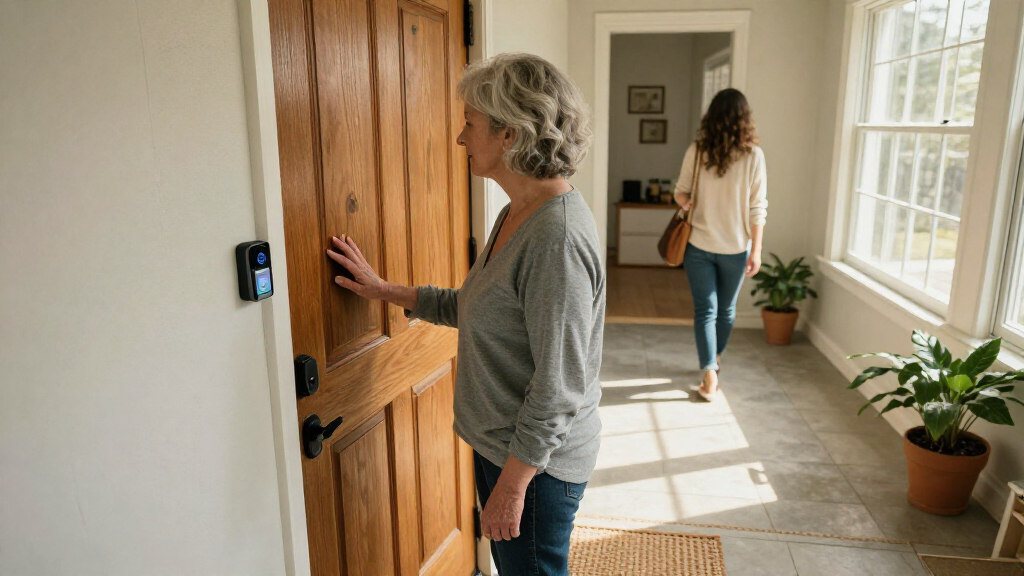
For example, imagine your mother hears a knock while she is settling into a comfortable chair. Her tablet receives an alert; she opens the Ring app, sees a courier holding a box, and asks them to leave it by the door. The benefit is practical and immediate. She controls the conversation without needing to open the door or stand up quickly.
That convenience depends on a few ordinary pieces working together: a compatible device, the Ring app, a working internet connection, and alert settings your parent can notice. A phone silenced overnight, a tablet left in another room, or a weak signal by the front step can spoil the experience. Set it up around your parent’s daily habits. If they use a tablet after breakfast but rarely check a phone, make the tablet the main answering device.
Think of the doorbell as a digital peephole with a voice, not a care system. It does not check whether someone is safe inside, detect a fall, or guarantee that a family member will see an alert. Families should keep separate plans for urgent help and regular in-person support.
Products Worth Considering

Oura Ring 4 Smart Ring – Silver – Size 8

Levoit Core 400S-P Smart Air Purifier for Large Rooms

LEVOIT Vital 200S-P Smart Air Purifier for Large Rooms
As an affiliate, we earn on qualifying purchases.
Compare Four Ring Alternatives by Power, Video, and Wi-Fi
If an older wired Ring model is the starting point, compare its practical features with current alternatives instead of assuming the product listing or model name tells the whole story. The Battery Doorbell 4K Pro and Wired Doorbell Plus offer dual-band Wi-Fi 6 in the supplied specifications, while the other two options use single-band Wi-Fi 4 at 2.4 GHz. All four list a 140-degree horizontal and vertical field of view, but their power and resolution differ.
| Model | Power | Video and view | Wi-Fi | Useful detail |
|---|---|---|---|---|
| Battery Doorbell 4K Pro (2nd Gen) | Battery | Retinal 4K; 140° × 140° | Wi-Fi 6, 2.4/5 GHz | Two-way talk with Audio+; IP55 |
| Battery Doorbell 2K Plus (2nd Gen) | Battery | Retinal 2K; 140° × 140° | Wi-Fi 4, 2.4 GHz | Two-way talk; up to 6× enhanced zoom; IP55 |
| Wired Doorbell 2K (2nd Gen) | Wired | Retinal 2K; 140° × 140° | Wi-Fi 4, 2.4 GHz | Two-way talk; up to 6× enhanced zoom; IP65 |
| Wired Doorbell Plus (2nd Gen) | Wired | 2K; 140° × 140° | Wi-Fi 6, 2.4/5 GHz | Two-way talk; up to 4× enhanced zoom |
The table helps narrow the options, but it does not settle installation or accessibility. A battery model avoids doorbell wiring, yet needs charging. A wired model avoids routine battery charging, yet depends on compatible existing wiring. The 4K model’s higher resolution may sound appealing, but a clear alert your parent can hear may matter more than extra image detail.
For instance, if your parent has a stable 2.4 GHz signal and wants to avoid wiring, a battery option may fit. If the home already has compatible wiring and the family prefers not to manage recharging, investigate a wired model. Check current model details with Ring before buying; product features and regional terms can change.
Choose Battery or Wired Power Based on the Home
Battery-powered models usually simplify installation because they do not rely on compatible doorbell wiring, while wired models can draw power from existing wiring when that setup meets the manufacturer’s requirements. The key tradeoff is who takes responsibility for keeping the unit powered: a battery removes the wiring dependency but adds a recurring charging task; wiring can reduce that task but brings compatibility and installation questions. Neither choice is automatically easier, since the mounting surface, Wi-Fi signal, indoor chime, and available help also affect day-to-day use. Check wiring compatibility before choosing a wired unit.
Consider your father’s front entrance. If the doorframe is brick and the existing chime is old, installation may take more planning than the phrase “just mount it” suggests. A battery doorbell might avoid a wiring question, but someone still needs to recharge it when needed. If charging is forgotten, the doorbell can go offline precisely when a visitor arrives. A wired model could reduce that recurring task if the existing system is compatible and correctly installed, though it may require an installer or additional work at the outset.
Ring’s supplied product information lists approximately 10 minutes as the average installation time for the Battery Doorbell 4K Pro. That is a model-specific estimate, not a promise for every home. A crooked frame, a difficult drilling surface, or a weak signal can add work. If your parent should not climb ladders or handle tools, arrange for a capable adult or qualified installer to mount and configure the device. The installation choice also affects long-term support: make sure the person who can troubleshoot or charge it will remain available.
Before purchase, stand where the doorbell will go and check the Wi-Fi signal with a phone. A strong signal at the router does not guarantee a usable connection at the entrance, and interruptions there can mean delayed alerts or no live view. Then list who will install it, who will recharge a battery if needed, and how indoor alerts will sound. A Ring Chime or compatible smart speaker may provide another way to hear an alert, depending on the setup. Confirm compatibility rather than assuming an existing chime will work.
Make Alerts Easy to See, Hear, and Answer
A doorbell only helps when your parent notices its alert and can answer without wrestling with the app. Check screen size, text size, audio clarity, alert volume, and device placement in the actual rooms where your parent spends time. These details affect whether an alert becomes a usable conversation or just another missed notification. A larger screen may make a visitor easier to recognize, while a louder indoor chime may matter more if the phone is often out of reach. The best setup often comes from a short practice session, not from reading a feature list.
For example, your aunt may hear the kitchen chime but miss a phone vibration while watching television. A louder compatible indoor chime could help her notice visitors, although it will not help if she spends most of her day in another room. Your father might see a visitor clearly on a tablet but struggle to find the answer button on a crowded phone screen. Put the answering device somewhere familiar, adjust settings where available, and practice opening live view and ending a call. The goal is to make the whole path from alert to conversation easy, not just to make the notification noticeable.
Try this simple setup sequence with your parent:
- Place the answering device where it is easy to reach and keep charged. A device left across the room can make the alert impractical even if it is set to ring loudly.
- Test the alert from the front door at different times of day, including when the television is on. Background noise and normal routines can mask an alert that seems obvious in a quiet test.
- Practice a call together: open the notification, view the visitor, speak, and close the app. Repeating the steps helps reveal confusing screens before your parent is trying to respond to an unfamiliar visitor.
- Adjust the setup if the image, text, or sound is hard to use; test an indoor chime or another device if appropriate. Each change should be tested in the place and conditions where your parent will actually rely on it.
Access needs differ, and software controls can vary by device and app version. Do not treat a successful test on your phone as proof that the setup works for your parent. Let them use it themselves. If they cannot reliably hear or see an alert, the doorbell may still help a family member monitor deliveries, but it should not become the only way visitors reach them.
Agree on Family Access Before Sharing the Camera
Family members may be able to receive alerts or view the camera through Ring’s shared-access arrangements, but account permissions should reflect what your parent wants. Decide who can view, when they may check, and how access can be changed before inviting anyone. The more people who can view the camera, the more likely they are to see visitors or neighbors your parent did not intend to share with. A camera at the front door can show neighbors, visitors, and shared areas, so privacy is part of the setup.
Suppose your brother lives nearby and can help with deliveries, while you live several hours away. Your parent may want your brother to receive motion alerts during the day and prefer that you only check in when they ask. That arrangement gives your brother information tied to a specific task while limiting unnecessary monitoring by family members farther away. Explain what alerts each person will receive and let your parent decide who gets them.
Discuss whether video will be recorded, who may review it, and how long stored footage remains available under the selected plan. Recording can help resolve a missed delivery, but it also creates a history of visits that may be sensitive; the benefit is only useful if your parent agrees with who can access it and why. Follow applicable local privacy and recording laws, especially if the camera could capture a shared walkway or neighboring property. Ring features and recording terms depend on model, software, subscription, and region; check current local details before deciding.
Keep account recovery and removal in mind too. If a family relationship changes or a helper no longer needs access, your parent should know who can update permissions and how to do it. A good shared setup feels like handing someone a spare key for a defined task: clear boundaries, a known purpose, and a way to take it back.
Know What Works Without a Recording Plan
Live viewing and alerts are different from saved video. Some live-view and alert functions may work without a paid plan, while recording history and reviewing saved clips generally depend on a subscription. That distinction changes what happens after a missed alert: live viewing lets someone respond while the visitor is there, but a saved clip may let the family check what happened later. Ring plan features and terms can change, so check the current details for your model and country before you count on recordings.
This matters when a parent wants only to answer the door. If your mother mainly needs to see a courier in real time and speak through the app, she may care more about a reliable live connection than a searchable video archive. A recording plan adds ongoing cost and stores footage that someone may need to manage; it makes sense when reviewing events later is important enough to justify both. If the family wants to review a missed delivery later, ask whether the required recording feature is included in the plan you are considering.
For example, a notification arrives while your father is napping. If the system is set up only for live interaction and nobody answers, you may not have a saved clip to review later. A recording plan may address that specific need, subject to its terms and availability, but it still does not guarantee every event will be captured or retained. Network issues, device settings, and plan limits can affect what is available.
Write down what you expect the doorbell to do: ring indoors, show a visitor live, notify a family member, or save clips. These are separate outcomes, and buying a plan for one does not necessarily solve the others; for example, a recording does not ensure your parent heard the doorbell in time to answer. Then verify each item against current Ring documentation. Do not buy based on an assumption that “video doorbell” means every feature works without a subscription. The distinction is as simple as a phone call versus a voicemail: one lets you talk now, while the other keeps a record for later.
Plan for Wi-Fi, Power, and Missed Alerts
A Ring doorbell needs more than a camera at the front door: its app features rely on a working internet connection and a compatible phone or tablet. Wi-Fi or power loss, a depleted battery, muted phone settings, or a service interruption can stop alerts or live viewing. These dependencies matter because a device that works during setup may still be unavailable when the router restarts or the answering phone is silenced. No alert system guarantees that someone will answer, so plan for ordinary failures before relying on it.
Picture a winter evening when the router restarts and a delivery arrives. The battery doorbell may still have power, but app viewing and notifications need network access. With a wired model, the home’s power and network arrangement also matter. In either case, a visitor could ring while your parent’s phone is charging in another room or its notifications are silenced. The practical weak point may be the least obvious one: the camera can be online while nobody is in a position to receive the alert.
Make a simple backup plan with your parent. They might keep an existing doorbell chime, ask a neighbor to help with packages, or arrange a family check-in if internet service is down. Test what happens when the answering device is locked and confirm the alert volume is audible during normal household noise. For a battery model, decide who will notice and manage charging. These steps will not prevent every interruption, but they make it clearer who will respond when the app cannot.
A Ring video doorbell is a convenience and home security aid, not an emergency response service, fall detector, or medical alert device. A visitor alert only describes activity at the door; it does not tell you whether your parent is safe inside or automatically contact help. If your parent needs urgent assistance, use an appropriate emergency or care arrangement. The camera can help identify a visitor; it cannot dispatch help when a medical emergency occurs inside the home.
Use the Doorbell to Make Everyday Visits Less Stressful
A well-matched doorbell can give an older adult more control over routine visits while helping family coordinate deliveries. It is most useful when the parent can hear or see an alert, use the answering device, and feels comfortable with any shared access. Start with one real household problem, such as reaching the door too slowly or missing package drop-offs, then see whether the device solves that problem. Naming the problem first makes it easier to judge whether the setup is helping, instead of assuming more camera features automatically mean more independence.
Take a practical example: your mother has arthritis and finds a fast walk to the front door uncomfortable. She uses a tablet for video calls every evening. A battery doorbell, a tablet placed on her side table, and an indoor alert she can hear may let her speak with visitors without rushing. You can help with setup and agree that you receive delivery alerts only during the day she prefers. The arrangement works because it fits her existing tablet habit and reduces a specific physical strain; if charging becomes a chore or the tablet alert is easy to miss, the benefit may disappear.
Keep the arrangement collaborative. Ask your parent to show you how they would answer when the phone is locked, what they want to do with an unknown caller, and who they want to have camera access. If they dislike being watched or find the app confusing, respect that feedback. Another alert method or a simpler home routine may fit better. A device that a parent feels pressured to use can add stress, even if it appears convenient to the rest of the family.
The clearest measure of success is not the camera’s resolution. It is whether your parent can handle a normal knock with less effort and more confidence. Choose a model that fits the home, test it together, and revisit the settings after a week of everyday use. That follow-up matters because real visitors, household noise, and charging habits often reveal problems that a brief setup test misses.
Frequently Asked Questions
Can my parent answer a Ring doorbell without getting up?
Yes, if the doorbell is online and your parent can use the Ring app on a compatible phone or tablet. They can view the visitor and speak through the app without walking to the door. Practice the steps together before relying on it.
Can I receive alerts or view the doorbell from my own home?
Ring supports shared access arrangements, subject to account setup and permissions. Discuss who can receive alerts or view the camera with your parent, and agree how to change or remove access. Give each person only the access your parent wants them to have.
Does a Ring video doorbell work without a subscription?
Some live-view and alert functions may be available without a plan, while recording history and reviewing clips generally require a subscription. Features and terms can vary by model and country and may change. Check Ring’s current local plan details before buying.
Will a Ring doorbell work with my parent’s existing chime?
That depends on the specific model and the home’s wiring and chime setup. Check Ring’s compatibility guidance before purchase. A compatible Ring Chime or smart speaker may offer another indoor alert option, depending on the setup.
What happens if the Wi-Fi goes out?
Live viewing and app notifications may stop when the internet connection is unavailable. A battery doorbell still needs network access for app features, and a wired model can also depend on the home’s power and network setup. Keep another way for your parent to hear visitors or get help.
Can a Ring doorbell call emergency services?
A video doorbell is not, by itself, an emergency response service. It should not be relied on to summon help if your parent needs urgent assistance. Arrange a suitable emergency plan separately.