This checklist is for older adults who want to manage more daily tasks at home, and for family members or caregivers helping them consider practical supports. It covers everyday independence across mobility, dressing, meal preparation, communication, reminders, and eating.

Turn quiet afternoons into listening time
- Thousands of audiobooks, podcasts and originals
- Listen on your phone, tablet or Echo — also offline
- Cancel anytime
Each section focuses on one item or area of advice. Where a product name is provided, it is presented as a pick to evaluate; the adaptive dressing stick section offers general guidance without a named product.
Use the checklist to identify which daily task feels difficult, then compare features with the person’s abilities, routines, and home setup. Check fit and ease of use in person when possible, and consider asking a clinician or occupational therapist for help with individual needs.
Reacher Grabber Tool
A reacher grabber can help someone retrieve items without stretching or bending as far. The named pick is the RMS Premium 7-Piece Hip and Knee Mobility Aid Kit. Because the product name identifies a kit, check exactly which pieces are included and whether the reacher is among them before choosing it.
A common mistake is assuming any reacher will suit every task. Consider the items the person wants to reach, how far away they are, and whether the tool’s grip feels manageable. Check the reacher’s length against the user’s reach and the storage space available. If grip strength or hand movement is limited, look for a control that can be operated comfortably; test it with a lightweight object before relying on it for routine use.
Think about where the tool will be used and whether it can be kept within easy reach. A reacher is for picking up objects, not for supporting body weight. Match the tool to the intended tasks, and seek professional guidance if bending or balance concerns affect safe use.
What to look for:
- Confirm the kit includes a reacher grabber.
- Choose a length suited to common reaching tasks.
- Test whether the handle is comfortable to squeeze.
- Check that the grip can hold the objects the user plans to retrieve.
- Consider where the tool will be stored between uses.
RMS Premium 7-Piece Hip and Knee Mobility Aid Kit

This kit includes tools to help with dressing, bathing, and retrieving items without bending or twisting. It is designed to support daily independence for people with joint or mobility limitations, including those recovering from hip or knee replacement.
Pros:
- Includes aids for dressing, bathing, and retrieving items
- Two rotating reachers in different lengths
- Leg lifter supports leg positioning in bed, chairs, or vehicles
- Designed to reduce bending and joint strain
Cons:
- The kit is designed for people with ongoing mobility limitations and may not suit every user
Best for: People who want a reacher as part of a mobility aid kit.
Not ideal for: Shoppers who need a confirmed standalone reacher without checking kit contents.
Bottom line: Confirm the included pieces and test the grip and length against everyday tasks.
Adaptive Dressing Stick
A dressing stick can help with clothing tasks such as guiding a garment into place when reaching or bending is difficult. This section has no named product pick, so focus on finding a tool that suits the user’s movements and clothing routine.
A frequent buying mistake is choosing a tool based on a general description without trying its ends on the garments involved. Consider which tasks are difficult: putting on a shirt, pulling up clothing, or managing sleeves may call for different handling. Check the stick’s length so it provides useful reach while remaining easy to control. The handle should feel secure, and the person should be able to guide the tool without twisting or straining.
Think about how the stick will work with the person’s usual clothing and whether it can be stored close to where they dress. If hand strength, range of motion, or balance is a concern, an occupational therapist can help assess technique and fit. A tool that is comfortable to handle and appropriate for the specific dressing task is more useful than one selected by name alone.
What to look for:
- Match the tool’s end to the clothing task.
- Choose a length that allows reach without awkward twisting.
- Check that the handle is easy to hold and guide.
- Try the tool with the clothing the person wears most often.
- Consider storage near the usual dressing area.
Electric Can Opener
An electric can opener may reduce the hand effort involved in opening cans. The listed pick is the Hamilton Beach Smooth Touch Electric Can Opener with Scissors. Before selecting it, check how it operates and whether its controls and setup feel comfortable for the intended user.
A common mistake is assuming an electric appliance will be easier for every person. Consider whether the user can position a can, operate the controls, and remove the lid comfortably. Counter space and access to an outlet also matter. If hand coordination is limited, try the opener with assistance first and observe whether the steps are clear and manageable. The product name mentions scissors; check their placement and whether the user can handle them safely and comfortably.
Think about the cans typically opened at home and whether the appliance’s size and placement fit the kitchen routine. Keep it where the user can reach it without awkward lifting, and follow the product instructions. If the person cannot confidently manage the opener alone, another can-opening method or assistance may be a better fit.
What to look for:
- Check that the controls are easy to see and operate.
- Consider the user’s ability to position a can securely.
- Confirm there is accessible counter space and an outlet.
- Check whether the included scissors are comfortable to handle.
- Try the steps with assistance before independent use.
Hamilton Beach Smooth Touch Electric Can Opener with Scissors
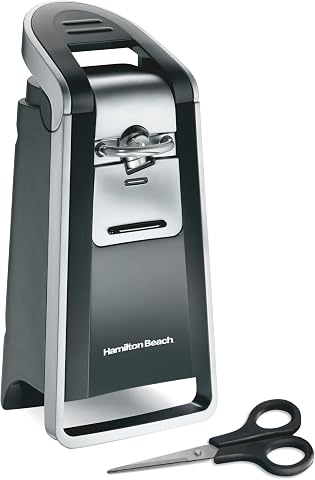
This automatic can opener cuts along the side of regular and pop-top cans, leaving smooth lids without sharp edges. Its easy-touch lever supports one-handed operation, and the extra-tall design accommodates different can sizes.
Pros:
- Leaves smooth, touchable lids without sharp edges
- Easy-touch lever enables one-handed operation
- Opens standard, extra-tall, and pop-top cans
- Includes stainless steel scissors that store on the unit
Cons:
- Requires an electrical power source
Best for: People who want an electric option for opening cans.
Not ideal for: Users who cannot position cans or operate the controls comfortably.
Bottom line: Check counter access, control handling, and the full opening process before relying on it.
Large Button Phone
A phone with large, easy-to-use controls may be worth considering when small buttons are difficult to see or press. The named pick is the Uvital Corded and Cordless Phone with Answering Machine for Seniors. Its name describes both corded and cordless use and an answering machine, but check the actual setup and controls before choosing it.
A frequent mistake is focusing on button size alone. Consider whether the user can read labels, hear calls, place calls, and manage the handset or base. Check how the phone connects in the home and whether the intended locations have suitable access. If the user needs saved contacts, emergency calling, or particular accessibility features, confirm those capabilities directly rather than assuming they are included.
Think about who will set up the phone and whether the user can manage its everyday steps independently. Try dialing a familiar number, answering a call, and retrieving a message together. Confirm that the corded or cordless arrangement fits the user’s routine and the home’s layout. A phone is most useful when the key tasks feel simple to the person who will use it.
What to look for:
- Check button size, labels, and visibility in the intended room.
- Test dialing, answering, and ending a call.
- Confirm how the phone connects and where it will be placed.
- Verify any needed saved-contact or accessibility features.
- Try the answering machine steps if messages are part of the routine.
Uvital Corded and Cordless Phone with Answering Machine for Seniors

This senior-friendly phone features one-touch speed dialing, a digital answering system, and adjustable loud volume to accommodate hearing impairments. It supports both corded and cordless use, with large buttons, braille markings, and a backlit display for easy operation, making it ideal for elderly users and those with cognitive or visual challenges.
Pros:
- Large buttons with braille markings for easy dialing
- Adjustable loud volume and loud ringer for hearing-impaired users
- Supports both corded and cordless operation with multiple handsets
- Easy to set up and use, ideal for seniors and individuals with cognitive impairments
Cons:
- Only one cordless handset included
- Does not support internet connections
- Limited to basic calling features without advanced smartphone integration
Best for: People who want a phone described as having corded and cordless use.
Not ideal for: Shoppers who need specific accessibility features without confirming them.
Bottom line: Test the call and message steps and verify the features the user relies on.
Talking Alarm Clock
A talking alarm clock may help make reminders more noticeable through spoken alerts. The listed pick is the ORKA Talking Medication Reminder Clock with Voice-Recordable Alarms. Its name points to medication reminders and recordable alarms; verify how those functions work and whether they suit the user’s routine.
A common mistake is assuming a reminder device will automatically match an existing medication schedule. Check how many alarms can be set, how they are recorded, and whether the user can hear and recognize them. Consider the clock’s placement, the room’s sound level, and whether the controls are easy to operate. If someone else will record or change reminders, confirm that they can do so reliably.
Before relying on the clock, set up a sample reminder and make sure the user notices and understands it. Confirm the time-setting and alarm-adjustment steps, and consider what happens if the device is moved or settings need updating. A reminder clock can support a routine, but the setup should be checked against the person’s actual schedule and should not replace any needed medication guidance.
What to look for:
- Confirm how many alarms can be set and recorded.
- Check that spoken reminders are audible in the intended location.
- Make sure the user or caregiver can set and change alarms.
- Test a sample alert and confirm it is understood.
- Place the clock where it can be heard and reached for adjustments.
ORKA Talking Medication Reminder Clock with Voice-Recordable Alarms
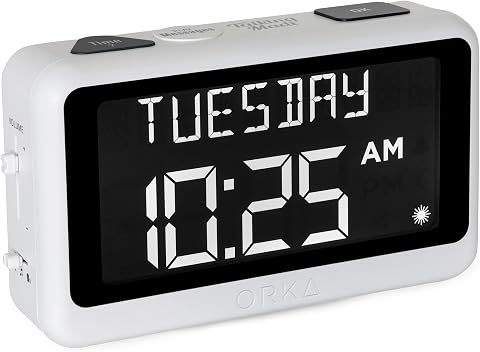
This AC-powered digital clock has a large display and announces the time, date, and day in six languages. It supports up to eight voice-recordable alarms, adjustable volume up to 90 dB, and a backup battery to retain settings during power outages.
Pros:
- Large display with extra-large digits
- Customizable spoken reminders in the user’s own voice
- Announces time and date in six languages
- Adjustable volume and backup battery for settings
Cons:
- Requires AC power for operation
- May require assistance with setup for users with memory difficulties
Best for: People who want spoken, recordable medication reminders.
Not ideal for: Users who cannot hear or manage the alarm setup without support.
Bottom line: Set up and test a sample reminder before adding the clock to a medication routine.
Easy Grip Utensils
Utensils that are easier to hold may help make mealtimes more manageable for some people. The listed pick is Weighted Utensils for Tremors and Parkinson’s, Stainless Steel Silverw. Check the full product details and exact contents, since the supplied name ends with “Silverw.”
A common mistake is assuming that added weight or a particular handle will help every user. Comfort and control vary, so consider how the utensil feels during the motions used at meals. Check handle thickness, balance, and overall weight, and whether the user can lift and maneuver it without extra effort. If possible, try one utensil before choosing a set, and consider the foods and dishes used most often.
Think about whether the user can grip, guide, and clean the utensils comfortably. The right fit depends on hand size, strength, coordination, and personal preference. A clinician or occupational therapist can suggest options when tremors or other movement concerns affect eating. Keep ease and comfort central: a utensil that feels tiring or awkward may not support the intended routine.
What to look for:
- Confirm the complete product name and what utensils are included.
- Check handle thickness and comfort in the user’s hand.
- Consider total weight and whether it is manageable to lift.
- Try the utensil with familiar foods and dishes when possible.
- Check that cleaning and storage fit the household routine.
Weighted Utensils for Tremors and Parkinson’s, Stainless Steel Silverware Set, 4

This heavy stainless steel silverware set is designed to help individuals with tremors or Parkinson’s maintain independence during meals. The set includes a knife, fork, tablespoon, and soup spoon, all with weighted, non-slip handles for added stability.
Pros:
- Provides stability for individuals with tremors or weak grip
- Includes a travel bag for portability
- Made of high-quality stainless steel with a polished finish
- Easy to clean and dishwasher safe
Cons:
- Heavy weight may be tiring for some users
- Design may not suit those preferring lightweight utensils
- Limited to four-piece set, may need additional utensils
Best for: People exploring weighted utensils for eating tasks.
Not ideal for: Users who find added weight tiring or difficult to maneuver.
Bottom line: Check the full listing and assess grip, balance, and comfort with familiar meals.
For a budget-first approach, start by identifying the daily task causing the most difficulty, then compare that need with items already available at home or through local support services. Prioritize the most-used task, confirm product contents and fit, and add other items only when they address a clear need.
Small changes can make routines feel more manageable when they suit the person using them. Review the checklist together, try options at a comfortable pace, and ask a clinician or occupational therapist for individualized advice when fit or safe use is uncertain.