
This guide provides clear instructions on how to set up an automatic pill dispenser for seniors, ensuring medication is taken correctly and on time. It is intended for caregivers or family members responsible for medication management. The process involves choosing the right device, configuring it properly, and maintaining it for daily use. Completing this ensures medication adherence and safety for the senior.
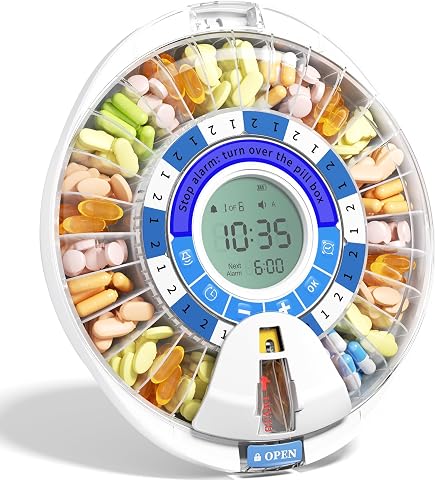
Betife 2nd Gen Automatic Pill Dispenser for Elderly with Alarm, 28 Slots, Lockable, Light Reminder, XL Display, 6 Dosage Rings
- ✔ Slots: 28
- ✔ Lockable: Yes
- ✔ Alarm: Yes
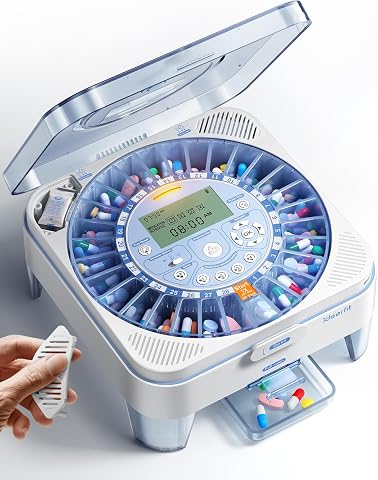
28-Day Automatic Pill Dispenser – One-Press Daily Dispense, Sound & Light Alerts, Moisture-Proof, Large Compartments
- ✔ Number of Compartments: 28
- ✔ Compartment Size: Ca tablets (0.79"), vitamins (0.31"), capsules (0.75")
- ✔ Desiccant Slots: Dual
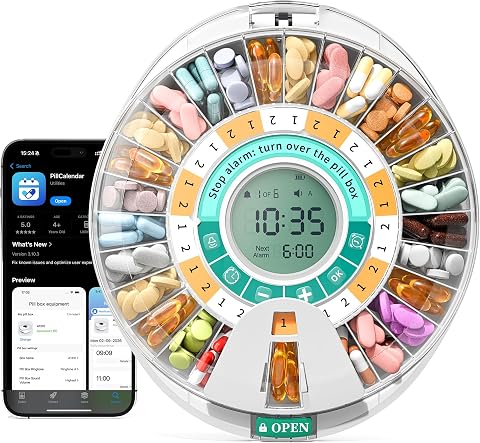
Betife Automatic Pill Dispenser, 28-Day Smart Bluetooth Pill Box with App Support, Alarms, Light Reminder, and Secure Lock
- ✔ Capacity: 28 days
- ✔ Connectivity: Bluetooth
- ✔ App Support: Yes
Difficulty: Intermediate | Time: 30-45 minutes
What You’ll Need
Tools & Materials:
- Automatic pill dispenser device
- Seniors’ medication in original bottles
- Smartphone or computer (if app setup required)
- Batteries (if not included)
- Internet connection (if device is Wi-Fi enabled)
Knowledge:
- Basic understanding of medication schedules
- Ability to follow setup instructions for electronic devices
- Familiarity with smartphone or computer use (if applicable)
Read the device manual before starting. Have all medication labels available for accurate input. Ensure batteries are charged or fresh before setup.

Betife 2nd Gen Automatic Pill Dispenser for Elderly with Alarm
Monthly Locked & Loaded Management: Fill this automatic pill dispenser once, set the 28-slot locked carousel, and you're...
As an affiliate, we earn on qualifying purchases.
Betife 2nd Gen Automatic Pill Dispenser for Elderly with Alarm, 28 Slots, Lockable, Light Reminder, XL Display, 6 Dosage Rings
The Betife 2nd Gen Automatic Pill Dispenser stands out for its combination of security, accessibility, and simplicity. Its lockable design prevents unauthorized access, and the XL LCD screen makes it easy for seniors to read and operate. The device’s spoken instructions and simple interface make it ideal for users with limited dexterity. Compared with other options, it offers a durable gearbox that ensures longevity but may be a bit complex for users unfamiliar with electronic devices. It’s best suited for those who need a secure, straightforward dispenser but not for very complex medication schedules exceeding 28 doses per cycle.
Pros:
- Secure lockable design prevents unauthorized access
- Large, easy-to-read LCD screen
- Simple, senior-friendly interface with spoken instructions
- Durable gearbox with long-term reliability
Cons:
- May be complex for users unfamiliar with electronic devices
- Limited to 28 doses per cycle, not suitable for complex regimens
Best for: Seniors requiring a secure, easy-to-use dispenser with basic scheduled dosing
Not ideal for: Users with highly complex medication routines or those unfamiliar with electronics
Bottom line: A top pick for seniors needing a secure, user-friendly device with straightforward scheduling.
“A top pick for seniors needing a secure, user-friendly device with straightforward scheduling.”

28-Day(1X) Automatic Pill Dispenser – One-Press Daily Dispense (No APP), Easy-to-Use Slide-Door Cup, Sound & Light Alerts, Moisture-Proof Dual Desiccants, Large Compartments for Tablets & Capsules
Easier for Seniors: One-Press Dispense: Designed for simple daily use—just press one button to release today’s dose. No...
As an affiliate, we earn on qualifying purchases.
28-Day Automatic Pill Dispenser – One-Press Daily Dispense, Sound & Light Alerts, Moisture-Proof, Large Compartments
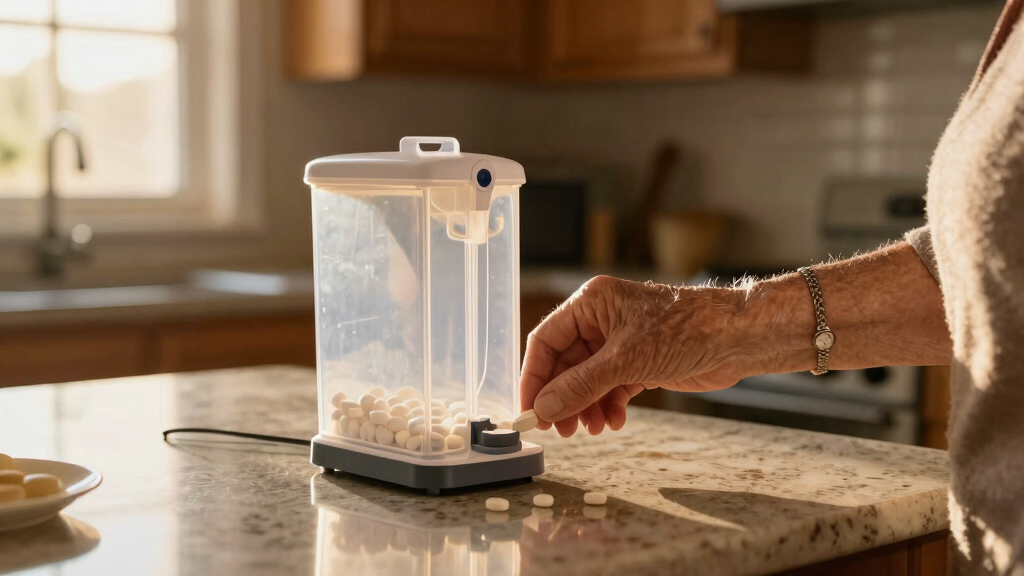
This dispenser emphasizes simplicity with its one-press daily dispense feature, making it ideal for seniors who prefer minimal interaction. Its large compartments handle a variety of pill sizes, and the moisture-proof design helps maintain pill integrity. Alerts via sound and light reduce missed doses, but it’s primarily suited for home use and doesn’t offer advanced scheduling or lock features. Compared to digital or app-based options, it sacrifices some customization but gains in straightforward operation, making it perfect for those who want reliable daily dispensing without extra technology.
Pros:
- Simple one-press operation suitable for seniors
- Hygienic slide-door cups for dispensing
- Sound and light alerts to prevent missed doses
- Moisture-proof with dual desiccants
Cons:
- Limited to home use only
- Not suitable for gummy capsules or very complex regimens
- No lock or app integration for added security
Best for: Seniors who need an easy, low-tech solution for daily medication management
Not ideal for: Those with complex schedules or in assisted living settings requiring higher security
Bottom line: Best for seniors seeking a straightforward, hygienic, and reliable daily dispenser with minimal fuss.
“Best for seniors seeking a straightforward, hygienic, and reliable daily dispenser with minimal fuss.”

Betife Automatic Pill Dispenser,28-Day Smart Bluetooth Pill Box, App Support Automatic Pill Case with 6 Alarms & Light Reminder, Monthly Timer Dispenser,Electronic Medication Management for Seniors
【Full APP Control & Bluetooth Sync】 Say goodbye to complicated manual setups. Our smart pill dispenser connects seamlessly...
As an affiliate, we earn on qualifying purchases.
Betife Automatic Pill Dispenser, 28-Day Smart Bluetooth Pill Box with App Support, Alarms, Light Reminder, and Secure Lock
The Betife Bluetooth Smart Dispenser is ideal for those comfortable with technology or with caregivers managing medication routines. Its app support allows for detailed scheduling, tracking, and remote monitoring, which is a significant advantage for complex regimens. The device features multiple alarms, light reminders, and a secure lock system with fingerprint access. However, it requires a smartphone for full functionality, and setup can be daunting for less tech-savvy users. While it offers the most advanced features, this pick makes the most sense for seniors with caregiver support or those wanting detailed medication management.
Pros:
- Seamless app integration for scheduling and tracking
- Manual operation with LCD display for accessibility
- Secure lock with fingerprint technology
- Multiple alarms and reminders for comprehensive coverage
Cons:
- Requires smartphone for full features
- Potential complexity in setup and use
- Higher price due to advanced features
Best for: Tech-savvy seniors or caregivers seeking advanced scheduling and remote oversight
Not ideal for: Seniors uncomfortable with smartphones or without caregiver support
Bottom line: Best for caregivers or tech-savvy seniors needing detailed control and remote monitoring of medication routines.
“Best for caregivers or tech-savvy seniors needing detailed control and remote monitoring of medication routines.”
As an Amazon Associate we earn from qualifying purchases.
Before You Start
Ensure the senior’s medication schedule is up-to-date and written down. Confirm the device is compatible with the types of pills being dispensed. Check that the location where the dispenser will be used is stable, dry, and easily accessible.
Step-by-Step Instructions
Step 1: Select the appropriate pill dispenser
Choose a model that fits the senior’s medication needs, including capacity, ease of use, and special features like alarms or remote monitoring. Verify the device is compatible with the types of pills to be dispensed, such as capsules or tablets.
Tip: Look for devices with clear displays, simple controls, and audible alerts to assist seniors with visual or hearing impairments.
Check: You have selected a dispenser that matches the medication volume, is easy to operate, and has the necessary features for the senior’s needs.
Step 2: Unbox and assemble the device
Remove the dispenser from its packaging, insert batteries if required, and assemble any removable parts following the manufacturer’s instructions. Ensure all components click or lock into place securely.
Tip: Double-check battery orientation and secure connections to avoid malfunction.
Check: The device powers on without errors, and all parts are correctly assembled and ready for programming.
Step 3: Input the medication schedule
Use the device’s interface or accompanying app to enter each medication’s name, dosage, and scheduled times. Confirm each entry carefully against the medication labels.
Tip: Input times accurately and verify each entry before saving. Use the manual or app tutorial if available.
Check: All medications are correctly scheduled, and the device displays the correct times and dosages without errors.
Step 4: Load the pills into the dispenser
Open the designated compartments or trays, and place the correct pills in each, matching the schedule entries. Ensure pills are secure and properly placed to prevent jams or misdispensing.
Tip: Use a small scoop or tool if needed to avoid dropping pills outside compartments. Do not overfill compartments.
Check: Pills are correctly loaded in each compartment as per schedule, with no pills outside or misplaced.
Step 5: Test the dispenser
Run a test cycle by activating the device to dispense medication as scheduled. Observe if it dispenses the correct pills into the container or tray.
Tip: Watch for jams or errors during the test. Listen for alerts or signals indicating successful dispense.
Check: The device dispenses the correct pills at scheduled times, with no jams or errors, confirming correct setup.
Step 6: Set reminders and alerts
If available, configure alarms, notifications, or app alerts to remind the senior to take medications. Verify the alert sounds or notifications work as intended.
Tip: Test alerts before first use to confirm they are audible or visible enough for the senior to notice.
Check: Reminders activate correctly at scheduled times, and the senior responds appropriately.
Step 7: Educate the senior on use
Show the senior how to recognize the device alerts, how to open compartments, and what to do if a pill is missed or a jam occurs. Provide simple written instructions if possible.
Tip: Use clear, simple language and demonstrate each step slowly. Ensure they feel comfortable operating the device.
Check: The senior can confidently operate the dispenser, respond to alerts, and report issues.
Common Mistakes to Avoid
- Overloading compartments with pills — Follow the device’s capacity instructions and avoid overfilling compartments to prevent jams.
- Entering incorrect medication times or dosages — Double-check each entry against medication labels before saving, and review schedule after input.
- Not testing the device after setup — Always run a test cycle to verify correct operation before regular use.
- Forgetting to replace batteries or recharge — Set a reminder to check batteries regularly and replace or recharge as needed.
Troubleshooting
Problem: Device does not turn on
Solution: Check batteries for proper placement, replace or recharge if needed, and ensure power switches are on.
Problem: Pills jam during dispensing
Solution: Remove the jammed pills carefully, clean the compartment if necessary, and ensure pills are not too large or damaged.
Problem: Device does not dispense at scheduled time
Solution: Verify the schedule settings, check for alarms or alerts, and ensure the device is powered and connected if applicable.
Problem: Incorrect pills dispensed
Solution: Recheck medication entries, refill compartments correctly, and run a test to confirm proper operation.
What Success Looks Like
The dispenser operates smoothly, dispensing the correct pills at the scheduled times with clear alerts. The senior can open compartments easily, and medication adherence is maintained without errors or jams.
Next Steps
Regularly monitor the device’s operation, refill pills before running out, and update the schedule if medication changes occur. Clean the device periodically according to manufacturer instructions. Contact support if persistent issues arise or if device malfunctions.
Frequently Asked Questions
How often should I refill the pill dispenser?
Refill the dispenser as soon as pills are running low, ideally weekly or according to the medication schedule to prevent missed doses.
Can the device handle different pill sizes and shapes?
Most devices are designed for standard pills, but check the manufacturer’s specifications for size and shape limitations before purchase.
What should I do if the dispenser jams frequently?
Remove and clean the jammed pills and compartments, verify pill size compatibility, and ensure proper loading. Contact support if jams persist.
Is it safe to use the dispenser with liquid medications?
Most automatic dispensers are designed for pills only. Do not attempt to dispense liquids unless specified by the manufacturer.